Vinculum Release Notes
Version 9.3.191
27th October, 2026
Vin OMS & WMS
Warehouse Management:
Change Requests/ Enhancements/ Improvements:
WAC Visibility Based on User Access Control
Who Should Care?
Warehouse Managers
Inventory Controllers
Finance Teams
Business Challenge
The WAC field was visible to all users in the Inventory View, making it difficult to restrict access to sensitive inventory cost information.
What's New?
Introduced a new user right, Inventory View – By SKU – View WAC, to control access to the WAC field. Only users assigned this right can view the WAC field.
By default, rights would be given to all users.
Business Impact
✅ Improved confidentiality of sensitive inventory cost information
✅ Controlled visibility based on user permissions
✅ Existing inventory operations and export functionality remain unchanged
Navigation: WMS >> Inventory >> Inventory View >> By SKU
SKU-Wise Cycle Count Access Control
Who Should Care?
Warehouse Operations Teams
Inventory Control Teams
Warehouse Managers
Business Challenge
Users could switch between SKU-wise and LPN-wise Cycle Count, potentially bypassing individual SKU scanning and affecting inventory verification accuracy.
What's New?
Introduced role-based access control to restrict the SKU/LPN toggle in Cycle Count across Web and WMS App.
Based on the configured role rights, users can be restricted to SKU-wise Cycle Count.
Without the required rights, the system follows the existing behaviour.
If the rights configuration is missing entirely, the system defaults to existing behaviour.
Business Impact
✅ Improved inventory verification accuracy through controlled counting methods
✅ Reduced risk of bypassing individual SKU scanning
✅ Consistent access control across Web and WMS App
Navigation: WMS >> Inventory >> Cycle Count
Vin FBS (Store Fulfillment App)
Change Requests/ Enhancements/ Improvements:
Multi-Quantity Picking in Vin FBS
Who Should Care?
Warehouse Operations Staff
Picking and Packing Personnel
Business Challenge
Previously, while processing an order line with a quantity of 10, users had to scan the product barcode 10 times to pick the complete quantity. This repetitive scanning increased picking time and effort, particularly when processing orders with higher quantities.
What's New?
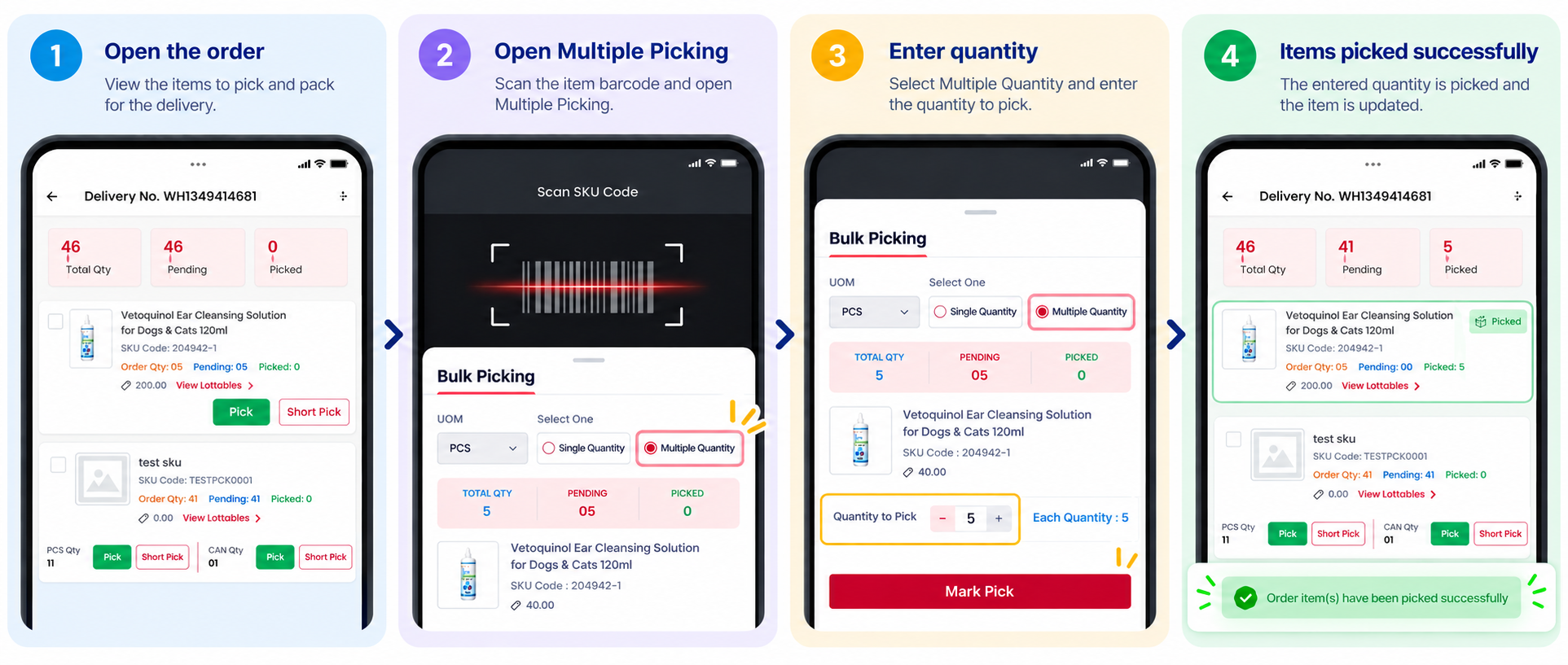
Vin FBS now supports Multi-Quantity Picking, allowing users to scan a product barcode once and enter the quantity to be picked in a single operation.
Users can scan the product barcode and specify the required picking quantity instead of scanning the same product repeatedly for each unit.
The system records the entered quantity in a single picking operation, reducing repetitive barcode scanning.
Business Impact
✅ Cuts down on redundant scanning of item barcodes when fulfilling orders.
✅ Accelerates batch fulfillment tasks for multi-item line requests.
✅ Lowers physical workload and operational overhead for staff members.
✅ Enhances total throughput and speed across warehouse workflows.
CasePack Handling in Vin FBS
Who Should Care?
Store Order Fulfillment Personnel
In-Store Application Users
Warehouse Operations Staff
Business Challenge
Earlier, Vin FBS lacked functionality for managing casepacks, creating operational hurdles for store personnel when processing casepack-configured inventory. Fulfilling orders for these SKUs necessitated precise unit conversions and accurate tracking across varying Units of Measurement (UOMs), specifically between casepack quantities and standard individual base units.
What's New?
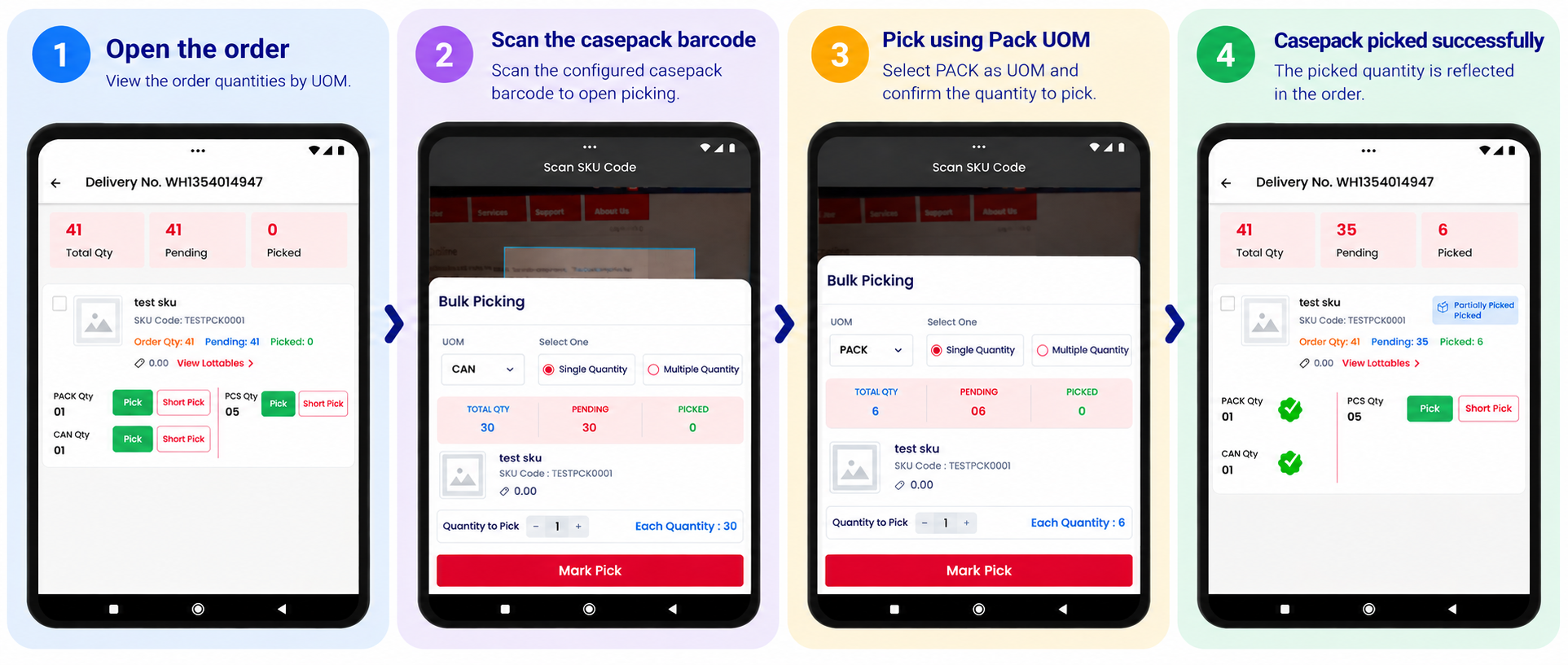
Vin FBS now supports casepack handling for store fulfillment, enabling users to pick casepack-enabled items through both manual and barcode-scanning workflows.
Users can manually pick casepack-enabled items by specifying the required quantity.
Users can scan the casepack barcode to pick items using the configured casepack UOM.
The app uses UOM Code, UOM Description and Conversion details received from the Order Status and Validate SKU Barcode APIs to identify the applicable UOM and convert quantities correctly between the casepack UOM and the base unit.
The order quantity continues to be maintained in the base unit, while the conversion value defines the number of base units contained in one casepack. For example, 1 case containing 12 pieces represents 12 base units.
Items without a configured casepack, or with a conversion value of 1, continue to follow the existing picking workflow.
Business Impact
✅ Enables reliable manual and barcode-based picking of casepack-enabled items in Vin FBS.
✅ Ensures accurate quantity conversion between casepack UOMs and base units.
✅ Reduces errors associated with handling different units of measurement during picking.
✅ Maintains the existing picking workflow for items without casepack configuration.
Credit Note Extraction API
Who Should Care?
Finance and Accounting Teams
Retailers & Brands
OMS Integration Teams
Business Challenge
Currently, Vinculum provides the Order Invoice PDF API to retrieve invoice content as a Base64-encoded stream. However, there is no equivalent API to retrieve Credit Note content generated against returns or refunds.
This requires clients to manually download Credit Notes from the application, increasing effort in reconciliation and customer communication.
What's New?
A new Credit Note PDF API is introduced, similar to the existing Order Invoice PDF API, enabling clients to retrieve Credit Note content programmatically through API requests.
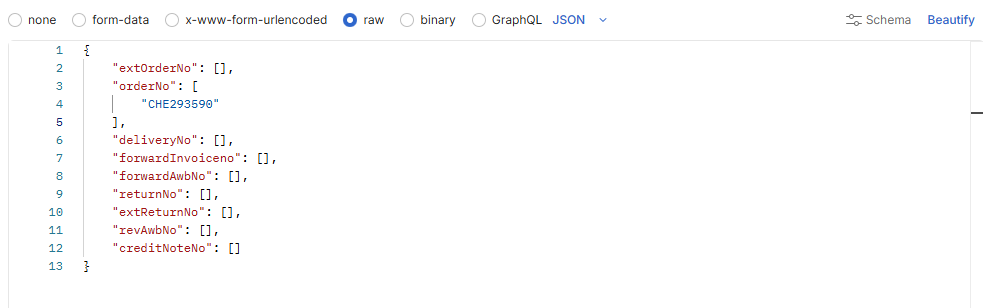
The API supports retrieving Credit Note content using reference identifiers such as External Order Number, Order Number, Delivery Number, Forward Invoice Number, Forward AWB Number, Return Number, External Return Number, Reverse AWB Number, and Credit Note Number.
Each reference parameter supports a maximum of 10 values per request.
The API returns the Credit Note PDF content as a Base64-encoded string stream, along with the associated reference identifiers to facilitate mapping on the client side.
Multiple reference parameters can be provided in a single request. When multiple parameters are supplied, the specified filters are applied together.
The API is applicable to OMS orders only and does not support Seller Panel orders.
The Credit Note must already be generated against a processed return for its content to be retrieved through the API.
Business Impact
✅ Enables programmatic retrieval of Credit Note content without manual downloads.
✅ Simplifies return/refund reconciliation and accounting processes.
✅ Supports automated delivery of Credit Note content through customer-facing notifications and emails.
✅ Reduces manual effort when handling high volumes of returns.
✅ Provides a standardized integration experience consistent with the existing Order Invoice PDF API.
Standard APIs
Change Requests/ Enhancements/ Improvements:
Credit Note Extraction API
Who Should Care?
Finance and Accounting Teams
Retailers & Brands
OMS Integration Teams
Business Challenge
Currently, Vinculum provides the Order Invoice PDF API to retrieve invoice content as a Base64-encoded stream. However, there is no equivalent API to retrieve Credit Note content generated against returns or refunds.
This requires clients to manually download Credit Notes from the application, increasing reconciliation effort and customer communication.
What's New?
We introduced a new Credit Note PDF API, similar to the existing Order Invoice PDF API, enabling clients to retrieve Credit Note content programmatically through API requests.
The API supports retrieving Credit Note content using reference identifiers such as External Order Number, Order Number, Delivery Number, Forward Invoice Number, Forward AWB Number, Return Number, External Return Number, Reverse AWB Number, and Credit Note Number.
Each reference parameter supports a maximum of 10 values per request.
The API returns the Credit Note PDF content as a Base64-encoded string stream, along with the associated reference identifiers to facilitate mapping on the client side.
Multiple reference parameters can be provided in a single request. When multiple parameters are supplied, the specified filters are applied together.
The API is applicable to OMS orders only and does not support Seller Panel orders.
The Credit Note must already be generated against a processed return for its content to be retrieved through the API.
Business Impact
✅ Enables programmatic retrieval of Credit Note content without manual downloads.
✅ Simplifies return/refund reconciliation and accounting processes.
✅ Supports automated delivery of Credit Note content through customer-facing notifications and emails.
✅ Reduces manual effort when handling high volumes of returns.
✅ Provides a standardized integration experience consistent with the existing Order Invoice PDF API.
End Point: /RestWS/api/eretail/v1/order/creditNotePDF