Vinculum Release Notes
Version 9.3.190
29th September, 2026
Vin OMS & WMS
Warehouse Management:
Change Requests/ Enhancements/ Improvements:
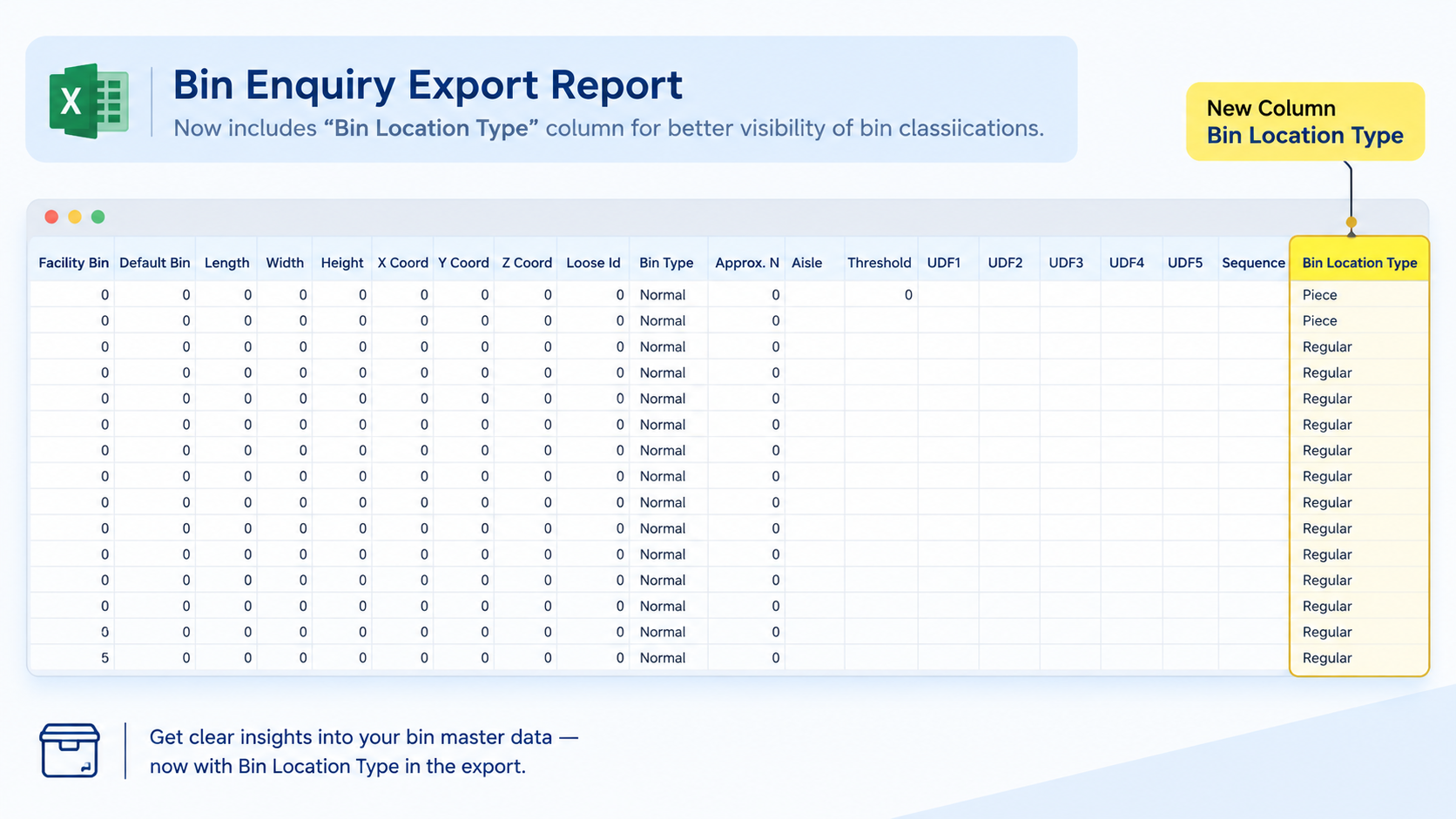
Bin Location Type in Bin Enquiry Export
Who Should Care?
Warehouse Teams
Inventory Teams
Multi-Client Operations
Business Challenge
Identifying the type of bin in exported Bin Master data required additional effort, especially when managing different bin types such as Case, Piece, Regular, and Letdown bins.
What's New?
The Bin Enquiry Export Report now includes a “Bin Location Type” column, displaying the corresponding bin location type for each exported bin.
Business Impact
✅ Better visibility of bin classifications
✅ Easier analysis of bin master data
✅ Reduced manual effort in identifying bin types
Navigation: WMS >> Bin Enquiry
Inbound QC – Rejected, WIP & Passed Quantity Summary
Who Should Care?
- Inbound QC Teams
- Warehouse Teams
- Quality Control Managers
Business Challenge
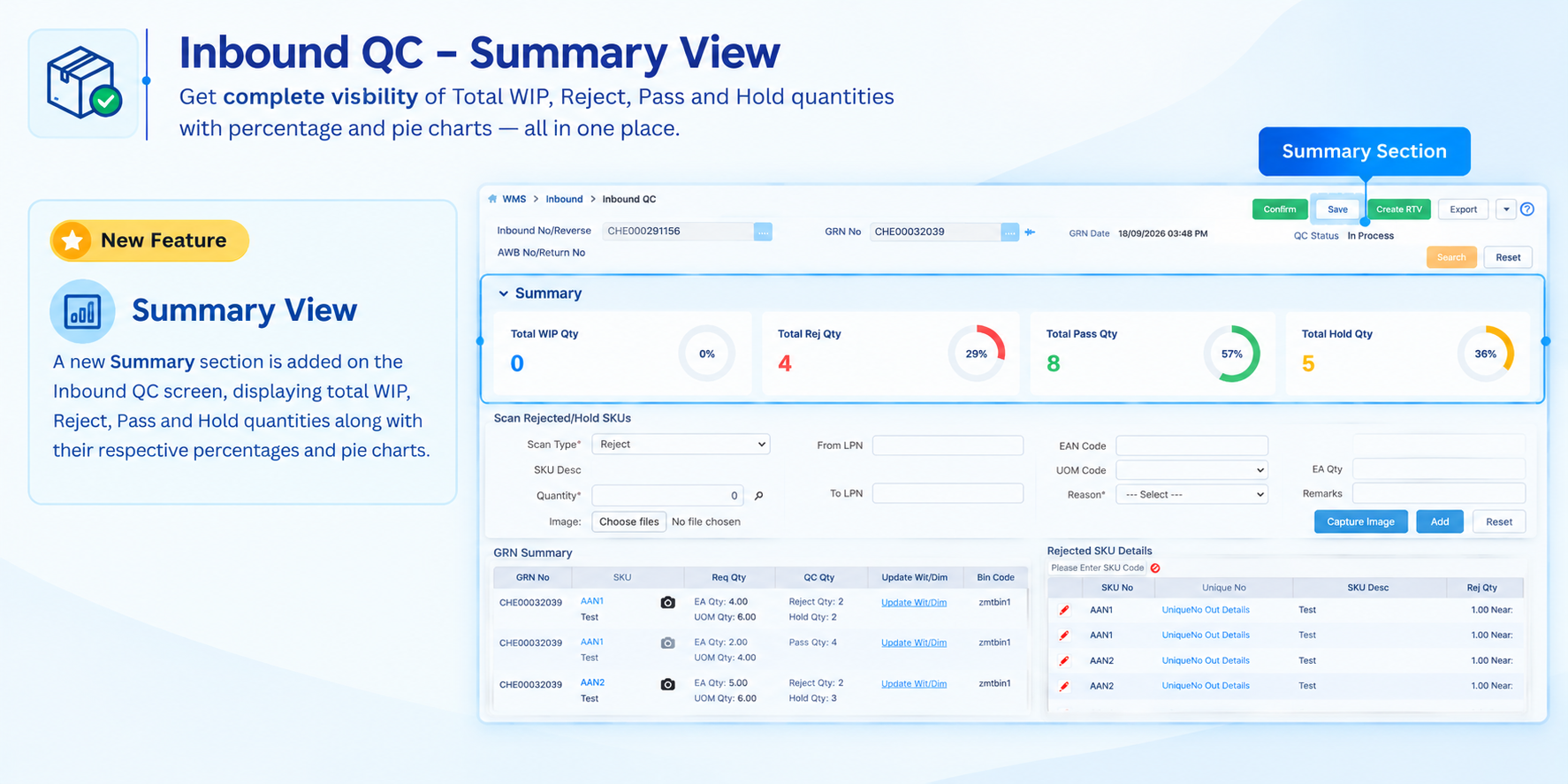
Tracking the quantity distribution across different QC statuses required manual calculation, making it difficult for QC users to quickly understand the progress of an inbound/GRN.
What's New?
A new Summary section is available on the Inbound QC screen(based on role rights), providing visibility of Total WIP, Reject, Pass, and Hold quantities, along with their respective percentages and pie charts.
Business Impact
✅ Quick visibility of inbound QC progress
✅ Reduced manual calculation effort
✅ Easier monitoring of Pass, Reject, Hold, and WIP quantities
Navigation: WMS >> Inbound >> Inbound QC
Customer-Based Manifest Search
Who Should Care?
Warehouse Operations Teams
Manifest Management Teams
Customer Operations Teams
Business Challenge
Finding manifests for a specific customer was difficult because the Manage Manifest screen did not provide a customer-based search filter.
What's New?
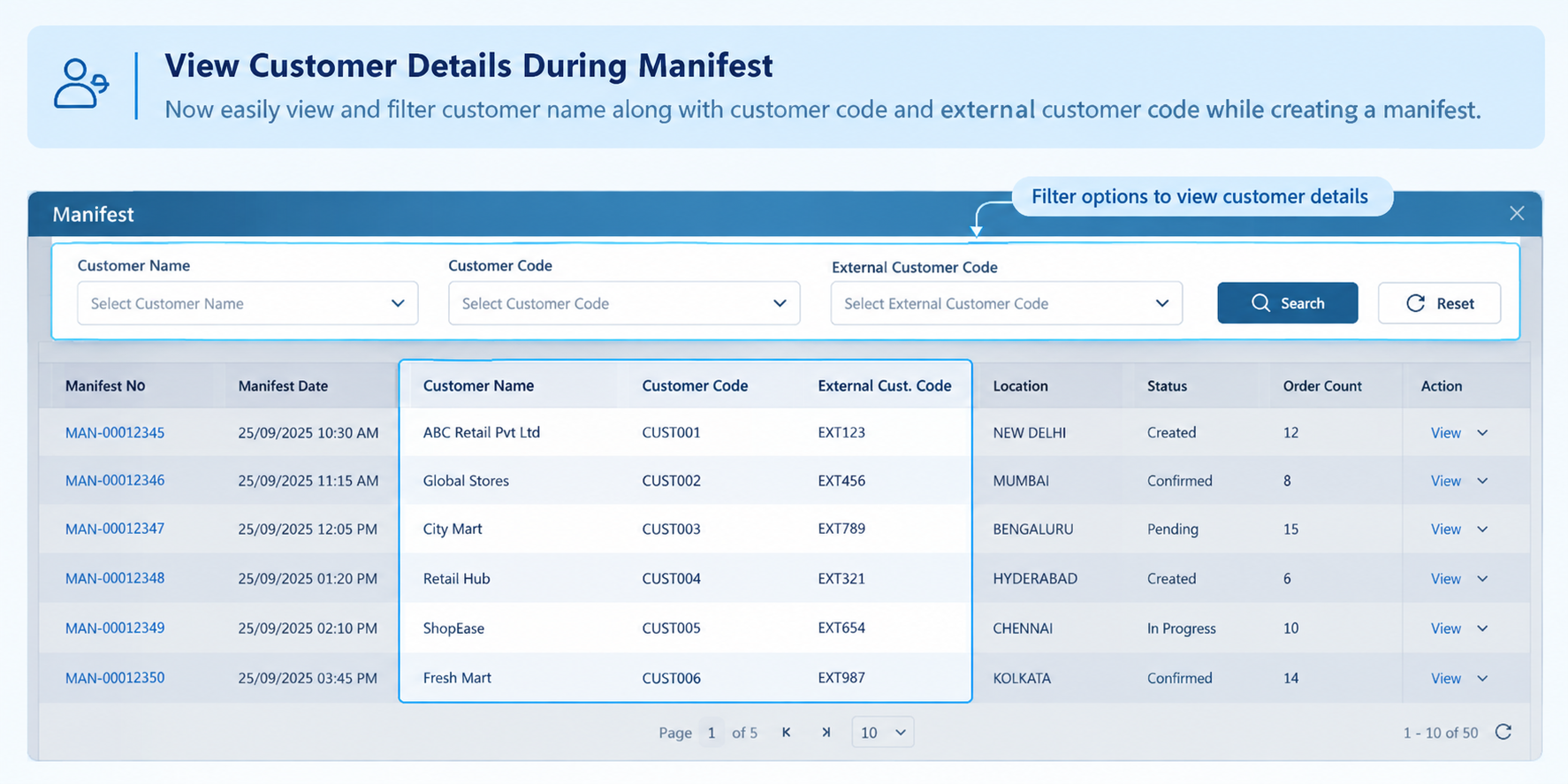
A new Customer Code filter is now available under Advanced Search in Manage Manifest.
Users can open the lookup to search and select a customer using:
Customer Code
External Customer Code
Customer Name
The lookup also provides customer details such as Customer Type, City, and State for easier identification.
Business Impact
✅ Faster identification of customer-specific manifests
✅ Easier customer-based manifest search
✅ Improved search accuracy with multiple customer details
Navigation: WMS >> Order Processing >> Manage Manifest
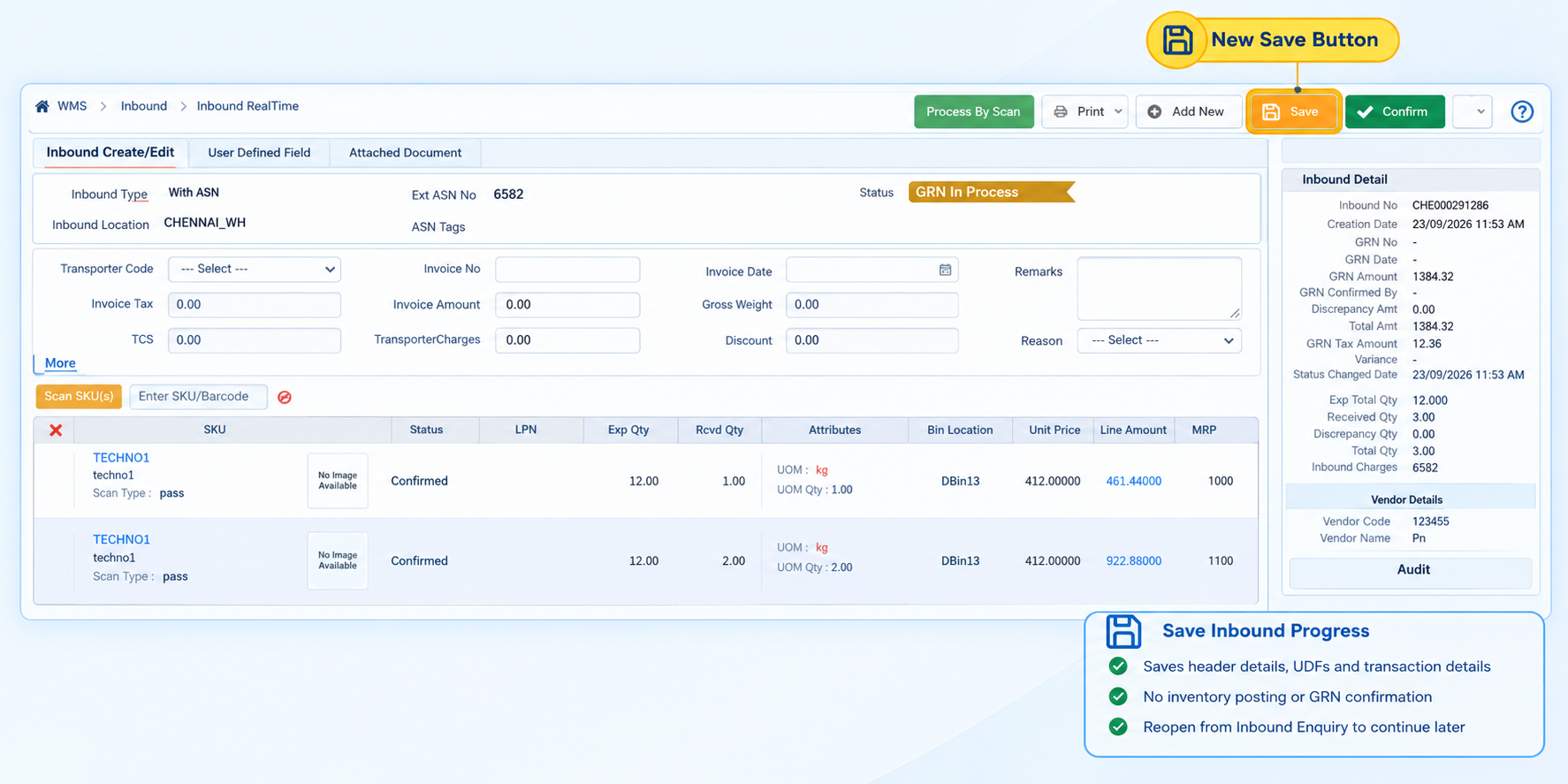
Inbound GRN Processing with Save
Who Should Care?
Inbound Operations Teams
Warehouse Supervisors
Receiving Teams
Business Challenge
During the GRN process, users could only Confirm or Cancel an inbound transaction. If processing could not be completed in one session, there was no option to save the current progress and continue later.
What's New?
A new Save option is now available on the Inbound GRN screen before the inbound is confirmed.
Users can save the current inbound progress, including header details, UDF information, transporter and invoice details, and other entered transaction details, without triggering inventory posting or GRN confirmation.
The saved inbound can be reopened from Inbound Enquiry and processing can be continued from the previously saved state.
Business Impact
✅ Save inbound progress without confirming the GRN
✅ Continue inbound processing at a later time
✅ Reduced risk of losing entered transaction details
✅ Greater flexibility for multi-step inbound processing
Navigation: WMS >> Inbound >> Inbound Real Time
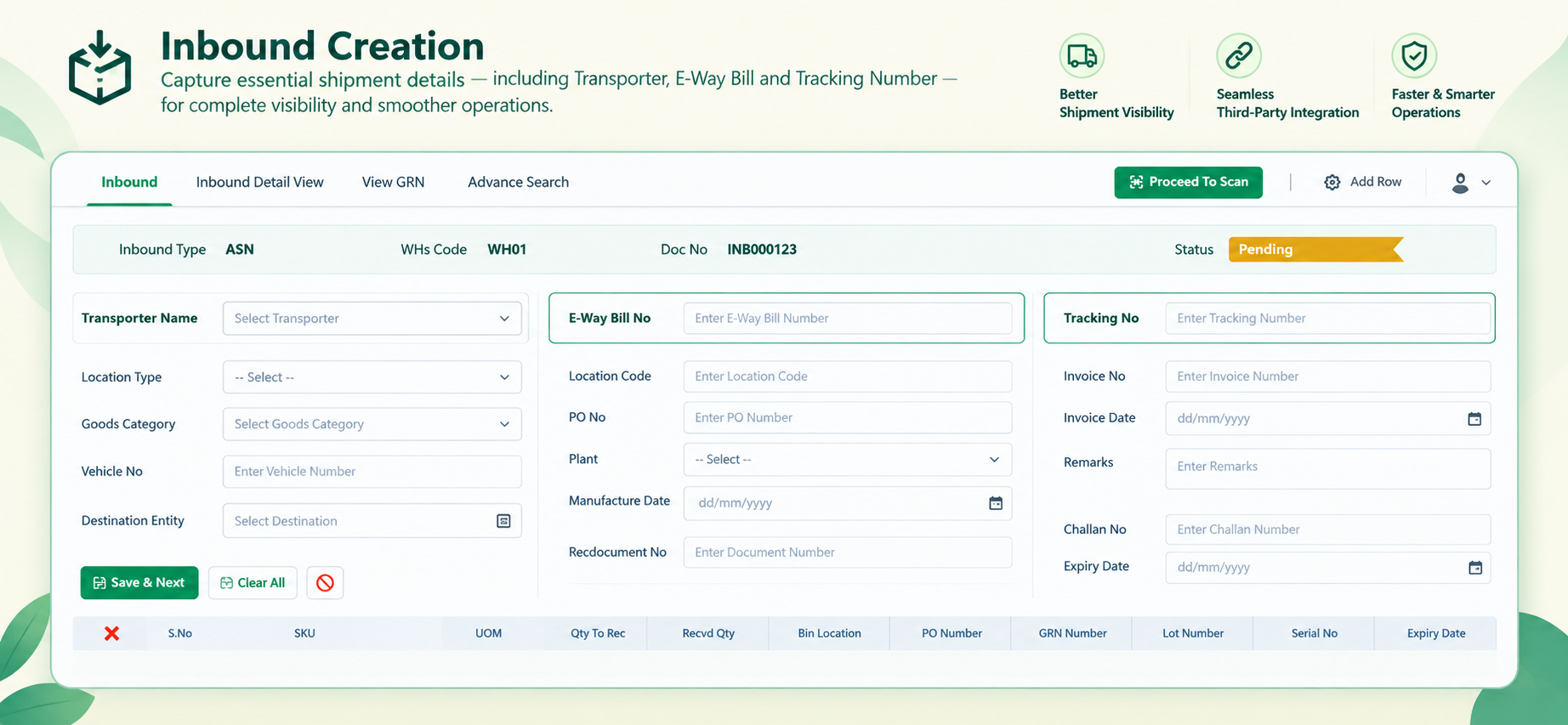
Enhanced Inbound Detail API with Transporter, E-Way Bill & Tracking Information
Who Should Care?
Retailers & Brands
Integration Teams
Warehouse Operations Teams
Logistics & Supply Chain Teams
Business Challenge
Inbound shipment information such as transporter details and E-Way Bill numbers was captured during inbound creation but was not fully available through the Inbound Detail API.
This limited visibility for clients integrating WMS data with third-party systems. Additionally, there was no dedicated Tracking Number field to support shipment tracking and transporter visibility.
What's New?
The Inbound Detail API now provides the following information at the inbound header level:
Transporter Name
E-Way Bill Number
Tracking Number
The Tracking Number can be captured during inbound creation and is supported for ASN, STO, PO, and DI inbound types. If a Tracking Number is available in the associated Gatepass, it can also be automatically populated in the inbound.
These fields are available in both V1 and V3 versions of the Inbound Detail API, with no changes required to the API request body.
Business Impact
✅ Improved shipment and transporter visibility
✅ Better integration with third-party logistics systems
✅ Easier shipment tracking through Tracking Number availability
✅ Reduced dependency on manual data sharing between WMS and external systems
✅ Consistent inbound information across API V1 and V3
Navigation: WMS >> Inbound >> Inbound Real Time
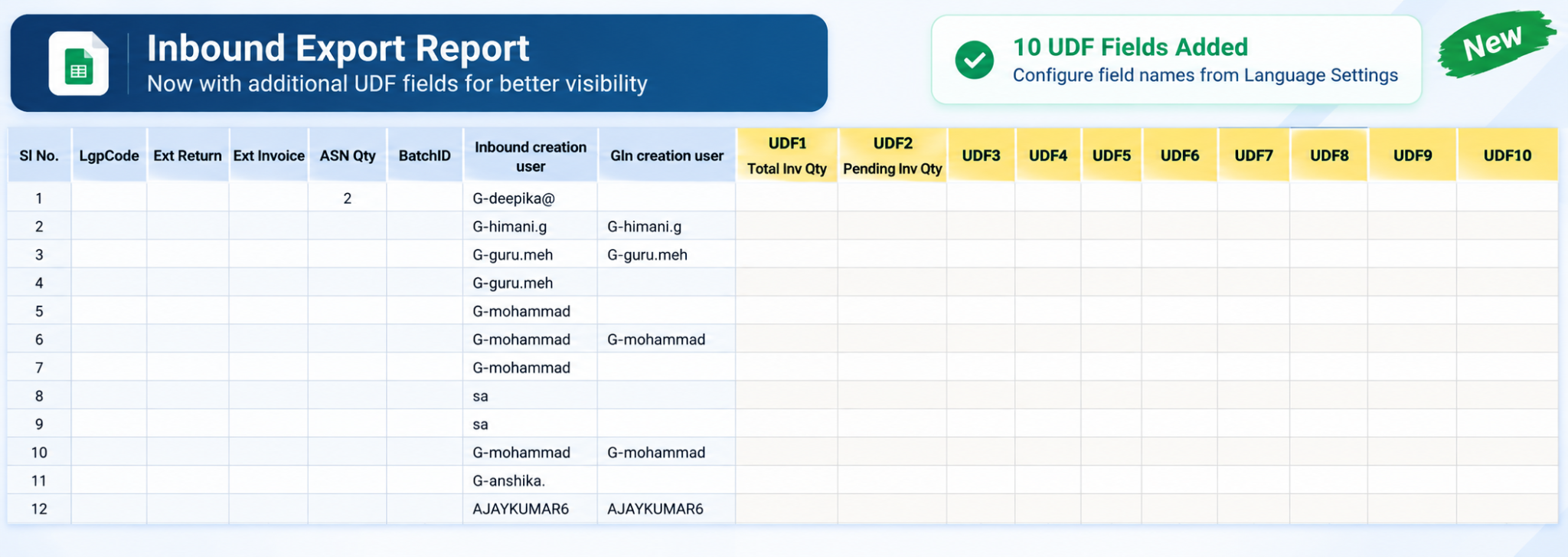
Include UDF Fields in Inbound Export
Who Should Care?
Warehouse Operations Teams
Business & Operations Teams
Reporting & Analytics Teams
Retailers & Brands
Business Challenge
The Inbound Export currently does not include the User Defined Fields (UDFs) captured at the inbound header level. This limits clients' ability to use important business-specific information from the export for their operational processes and reporting.
What's New?
The Inbound Export has been enhanced to include all 10 inbound header-level UDF fields — UDF1 to UDF10.
Exported values are populated from the corresponding Inbound UDF fields.
UDF column headers will use the display names configured in Language Settings.
For example:
UDF1 → Total Inv Qty
UDF2 → Pending Inv Qty
If a label override is configured in Language Settings, the export will display the overridden label.
This behavior is extended consistently across UDF1–UDF10.
Business Impact
✅ Improved visibility of business-specific inbound information
✅ Enables teams to use UDF data directly in inbound exports
✅ Supports more accurate operational reporting and downstream business processes
✅ Provides configurable UDF column names through Language Settings
✅ Eliminates the need for manual extraction of UDF information
Navigation: WMS >> Inbound >> Inbound Enquiry
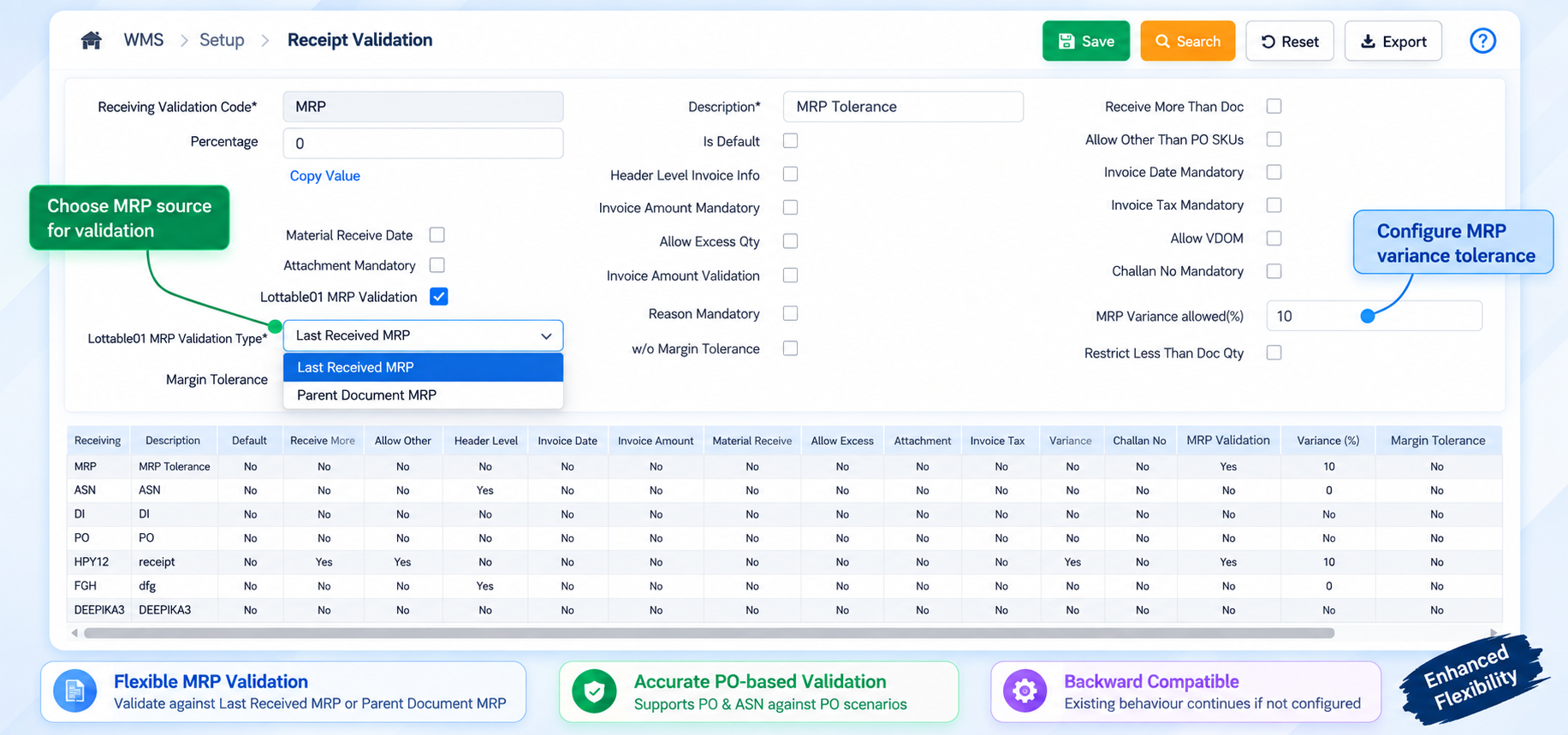
Modify PO Receive Validation Logic Based on PO SKU MRP
Who Should Care?
Inbound Operations Teams
Warehouse & Receiving Teams
Procurement Teams
Teams Managing PO/ASN Receipts
Business Challenge
The existing Lottable 01 MRP variance validation uses the last received MRP as the primary reference. The client requires receipt validation to be aligned with the MRP defined against the PO SKU line, so that the configured MRP variance percentage is calculated against the appropriate business document.
What's New?
The Lottable 01 MRP Validation configuration has been enhanced with a dropdown to determine the source MRP used for variance validation:
Last Received MRP – Continue validation against the last received MRP. If no last received MRP exists for the SKU and location, the system will use the SKU Master MRP.
Parent Document – For PO receipts, the system will use the MRP from the corresponding PO SKU line. For ASN against PO, the applicable parent PO MRP will be used.
Null – If no value is configured, the existing validation behavior will continue, maintaining backward compatibility.
When Parent Document is selected, the last received GRN MRP will not be considered for calculating the tolerance. The existing MRP variance calculation and Lot Query Rule validation sequence remain unchanged.
Business Impact
✅ Aligns MRP validation with the applicable PO SKU MRP
✅ Provides flexibility to choose the MRP source for receipt validation
✅ Improves accuracy of MRP variance validation for PO and ASN receipts
✅ Maintains backward compatibility for existing customers and configurations
✅ Ensures partially received PO lines continue using the applicable PO line MRP for subsequent receipts
Navigation: WMS >> Setup >> Receipt Validation
Bulk IMEI Scanning in Sort to Box
Who Should Care?
Warehousing & Fulfilment Teams
Pick/Pack Operators
Operations Teams handling serialised/IMEI-enabled SKUs
Business Challenge
Previously, bulk scanning was restricted for IMEI-enabled SKUs, resulting in the error “Bulk scanning is not allowed for serial tracking [IMEI]”.
This limited operational flexibility when processing serialised products during Sort to Box.
What's New?
Bulk scanning is now supported for IMEI/serial-tracked SKUs during Sort to Box.
IMEI capture is supported for both EACH and BULK scanning.
A dedicated IMEI entry popup allows users to scan or enter multiple IMEIs.
The popup displays the required IMEI count based on the sorting quantity.
Users can proceed with sorting after capturing an IMEI.
LPN mixing rules continue to validate IMEIs against applicable order and customer configurations.
Available on both Sort to Box Web and WMS App
Business Impact
✅ Enables faster processing of IMEI-enabled SKUs through bulk scanning.
✅ Reduces manual effort during serial/IMEI capture.
✅ Provides a guided IMEI capture experience during Sort to Box.
✅ Maintains validation of order and customer mixing rules.
✅ Improves operational flexibility for serialised inventory.
Standard APIs
Change Requests/ Enhancements/ Improvements:
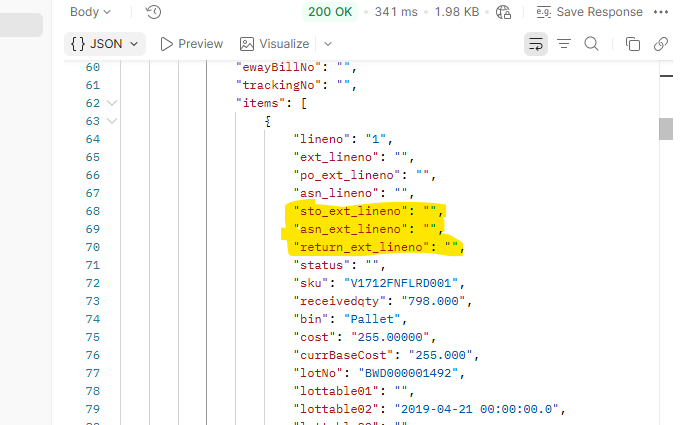
STO, ASN & Return External Line Number in Inbound Detail API Response
Who Should Care?
Integration/IT Teams
Warehouse & Inbound Operations Teams
Clients on SAP
3PL/Retail Partners
Business Challenges
External system lets clients store and maintain line numbers at the SKU level, but this external line number was only available for PO-based inbounds (via po_ext_lineno).
For STO, ASN, and Return-based inbounds, no equivalent field existed — making accurate line-level mapping between external systems and the WMS difficult for clients relying on these inbound types.
What's New?
Three new fields are now returned at the line level in the Inbound Detail API response, across both V1 and V3:
sto_ext_lineno — STO external line number
asn_ext_lineno — ASN external line number
return_ext_lineno — Return external line number
No changes to the request body or any other response parameters.
Business Impact
✅ Accurate line-level mapping for STO, ASN, and Return inbounds
✅ Consistent line-number tracking across all inbound types (matching existing PO support)
✅ Reduced manual reconciliation for clients on External System
End Point: /RestWS/api/eretail/v1/inbound/detail
/RestWS/api/eretail/v3/inbound/detail
EXT USN Visibility in STO Details
Who Should Care?
Integration Teams
Retail Operations Teams
Billing & Fulfilment Teams
Business Challenge
STO webhook responses provided the system-generated USN, while clients maintaining their own External USN series could not access this identifier through the STO detail response.
What's New?
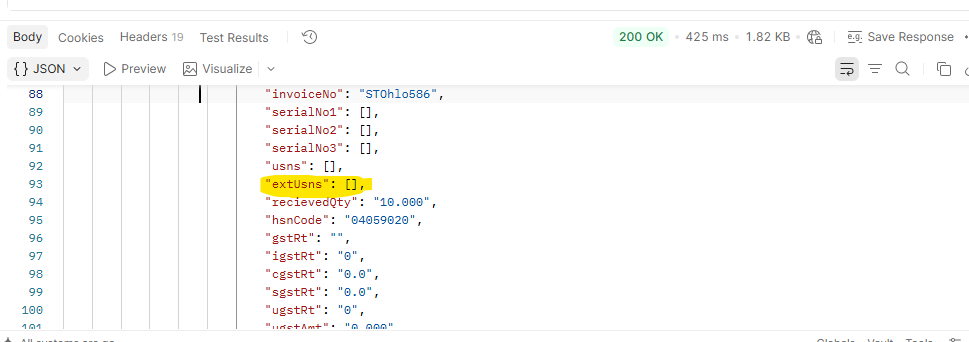
The EXT USN is now available at the STO item level through the extUSNs parameter in STO Detail API V1 and V2. The value is derived from the external unique item number maintained in the system.
Business Impact
✅ Improved visibility of client-specific USN numbers
✅ Easier integration with external billing and barcode processes
✅ Consistent EXT USN availability across STO API versions
End Point: /RestWS/api/eretail/v1/order/stoDetails
/RestWS/api/eretail/v2/order/stoDetails
Inbound Creation Date Added to Inbound Details API
Who Should Care?
Warehouse Operations Teams
Supply Chain & Logistics Teams
Business & Operations Analysts
Integration Teams
Retailers & Brands
Business Challenge
Clients rely on the Inbound Details API for operational reporting and warehouse performance monitoring.
However, the API did not provide the Inbound Creation Date, making it difficult to calculate inbound Turnaround Time (TAT), measure inbound ageing, monitor the inbound pipeline, and generate accurate operational reports.
What's New?
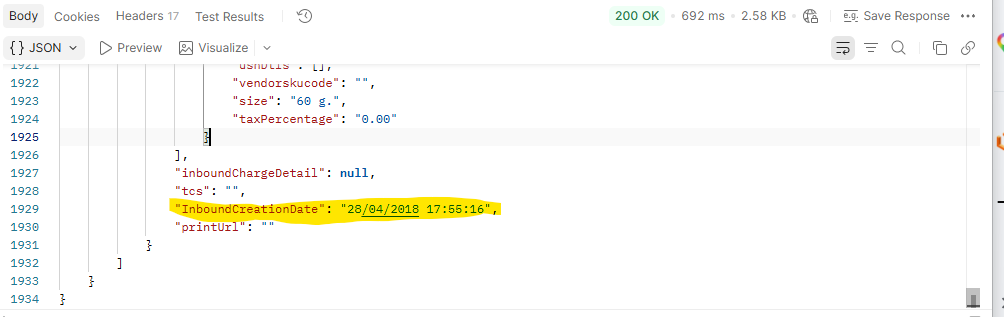
The Inbound Details API now includes a new InboundCreationDate field for every inbound record.
Provides the actual inbound creation date and time.
Mapped to the inbound creation timestamp.
Available in both V1 and V3 versions of the Inbound Details API.
No changes are required to the API request parameters.
The field is returned irrespective of the filter option used, including Without Filter, Filter 1, and Filter 2.
Business Impact
✅ Enables accurate Inbound Turnaround Time calculation.
✅ Improves inbound ageing visibility.
✅ Supports better monitoring of the inbound pipeline.
✅ Enables more accurate operational and warehouse performance reporting.
✅ Provides reliable timestamp data for downstream analytics and integrations.
End Point: /RestWS/api/eretail/v1/inbound/detail
/RestWS/api/eretail/v3/inbound/detail