
Vinculum Release Notes
Version 9.3.188
04th August, 2026
Vin OMS & WMS
Order Management:
Key Bug Fixes:
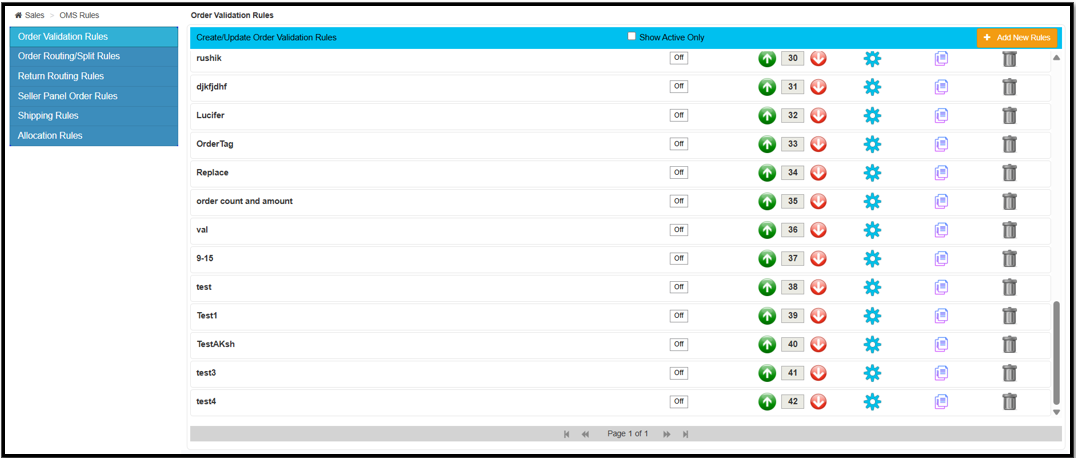
Bug Fix: Scroll Bar & Pagination on Order Validation Rules
Issue
Users could view only the first 10 Order Validation Rules due to the absence of a vertical scrollbar and pagination controls. This made it difficult to access, review, or update additional rules, especially in environments with large rule configurations.
Fix Implemented
The Order Validation Rules screen has been updated with vertical scrolling and pagination support, enabling users to seamlessly navigate and manage all configured validation rules.
Impact
Restores access to all configured Order Validation Rules.
Improves usability for customers managing large rule sets.
Eliminates display limitations and unnecessary support escalations.
Enhances operational efficiency when reviewing and maintaining validation rules.
Navigation: Vin e-Retail >> Sales >> OMS Rules
Preserve Original Text Formatting in Order Import
Issue
During order import, customer address fields were automatically converted to uppercase, causing the original text formatting to be lost. This resulted in inconsistencies in shipping labels and customer information.
Fix Implemented
The order import process has been updated to preserve the original text formatting (uppercase, lowercase, or mixed case) exactly as provided in the import file.
Impact
Preserves the original customer address formatting during import.
Ensures shipping labels accurately reflect imported customer information.
Eliminates unwanted text conversion during order creation.
Improves consistency across imported order data and downstream processes.
Warehouse Management:
Change Requests/ Enhancements/ Improvements:
Minor Enhancement: EAN Display in Sort to Box
Who Should Care?
Warehouse Associates
Sortation Teams
Warehouse Supervisors
Business Challenge
During the Sort to Box process, only the SKU code was displayed, making it difficult for barcode-driven operations to quickly identify products using their EAN codes.
What's New?
The Sort to Box screen now displays the EAN (Barcode) above the SKU name in both the Pending SKU and Scanned SKU sections. This enhancement is controlled through the existing configuration and is displayed only when enabled.
Business Impact
✅ Enables faster product identification during sortation
✅ Improves accuracy for barcode-driven warehouse operations
✅ Reduces dependency on SKU codes for item verification
✅ Enhances operator efficiency without changing the existing sorting workflow
7-Day Slab in Inventory Ageing Report
Who Should Care?
Inventory Planners
Warehouse Operations Teams
Inventory Control Teams
Business Challenge
The existing inventory ageing report supported broader ageing slabs (such as 0–15 days), making it difficult for businesses with fast inventory turnover to accurately monitor stock freshness and replenishment cycles.
What's New?
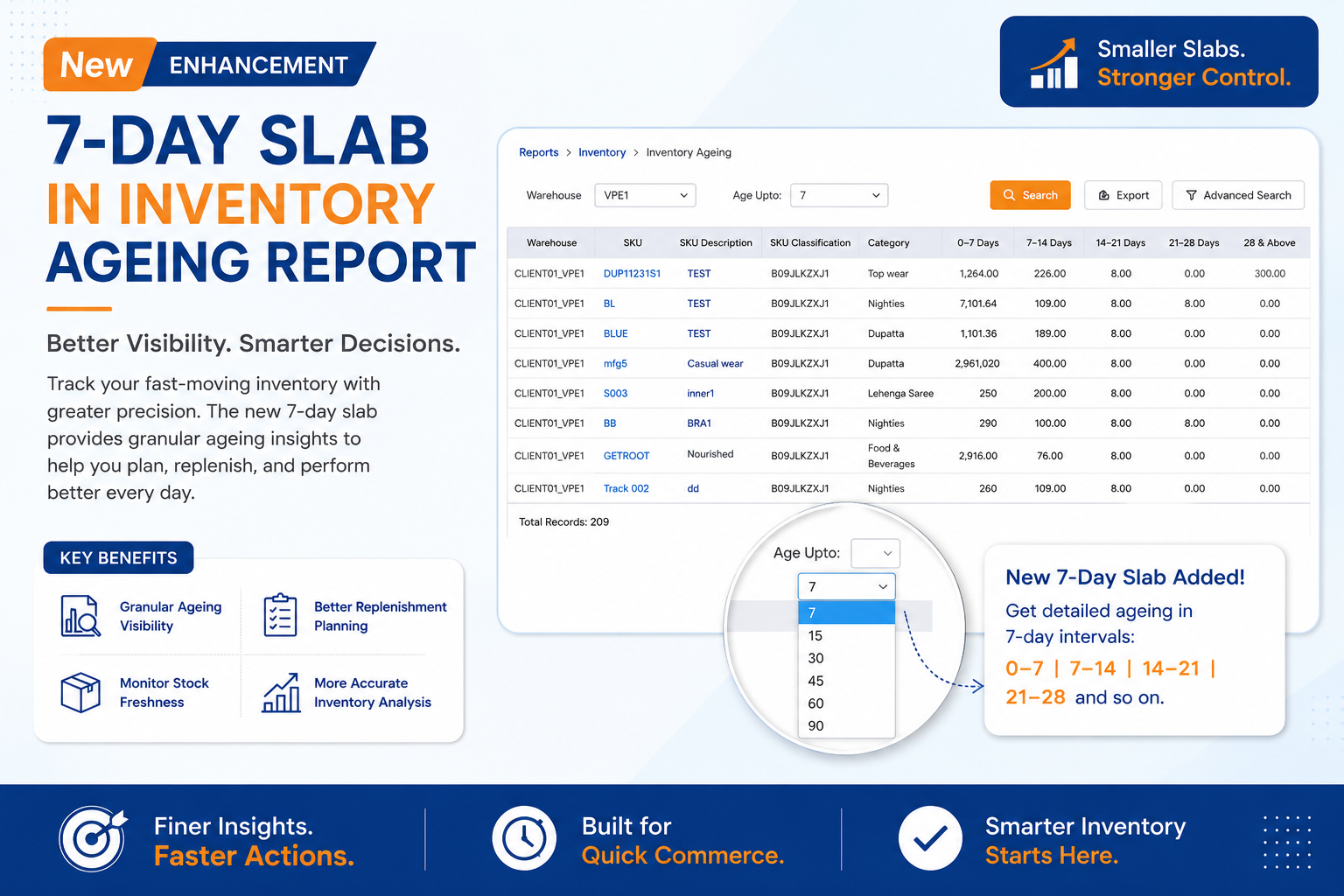
A new 7-day ageing slab has been added to the Inventory Ageing report. Users can now select the 7-day slab option to view inventory in smaller ageing intervals (0–7, 7–14, 14–21 days, and so on), providing more granular ageing analysis. Existing slab options and report functionality remain unchanged.
Business Impact
✅ Provides finer visibility into inventory ageing
✅ Enables better replenishment planning for fast-moving inventory
✅ Improves monitoring of stock freshness
✅ Supports more accurate inventory analysis and decision-making
New Forward Order Exception Recording
Who Should Care?
Warehouse Packing Teams
Shipping Operations
Quality & Audit Teams
Business Challenge
Orders processed through the exception flow did not generate standard packing videos, making it difficult to verify shipments and resolve customer disputes for incorrectly packed or dispatched orders.
What's New?
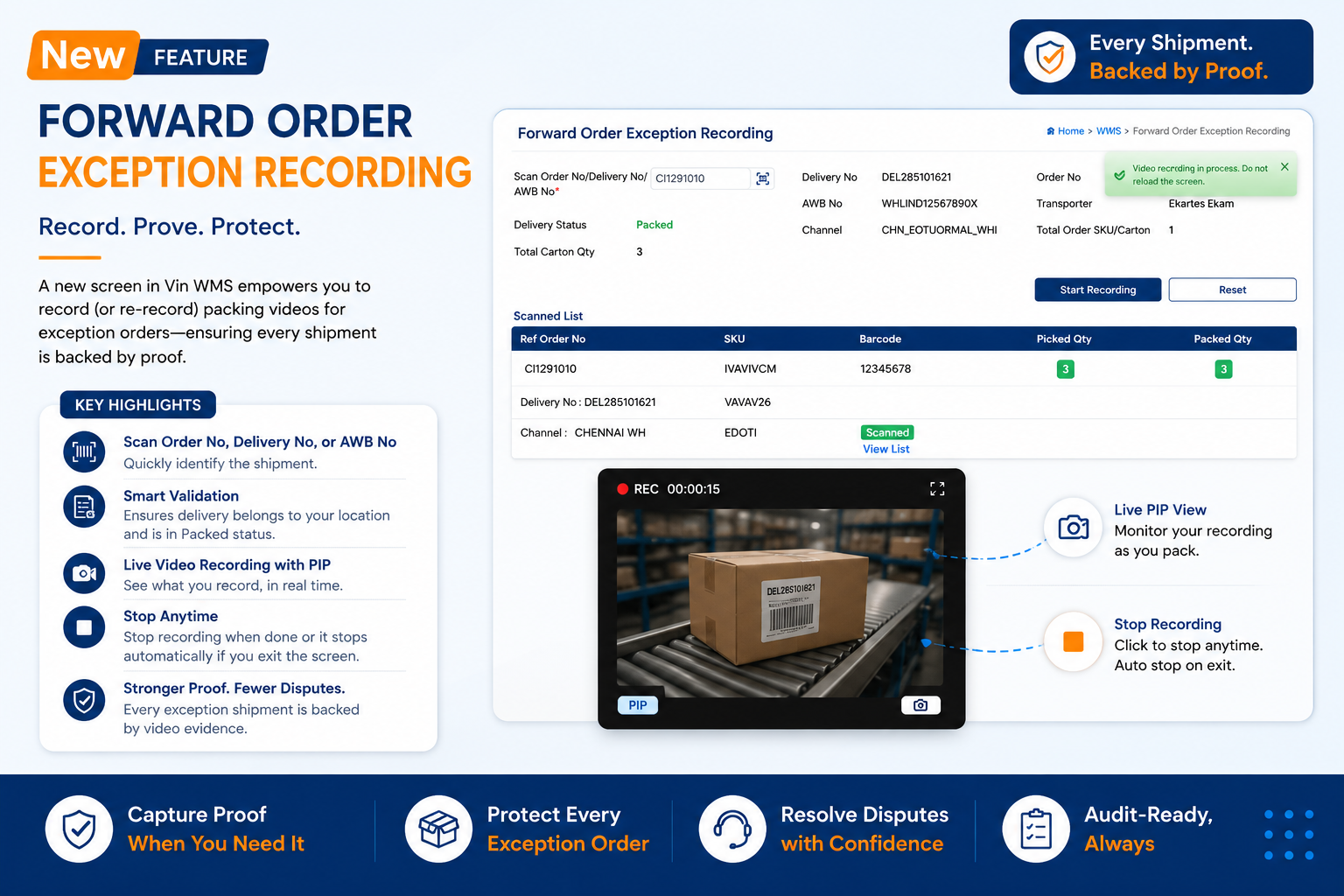
Introduced a new Forward Order Exception Recording screen that enables users to manually record or re-record packing videos for exception orders.
Users can scan an Order Number, Delivery Number, or AWB Number to identify the shipment, after which the system validates the delivery and records the video against the corresponding delivery for future reference. A live Picture-in-Picture (PIP) view is also provided during recording.
Business Impact
✅ Enables video proof for exception-based shipments
✅ Strengthens audit trails and dispute resolution
✅ Improves shipment verification for packed orders
✅ Reduces the risk of incorrect dispatches
✅ Simplifies manual recording and re-recording for exception scenarios
Navigation: WMS >> Order Processing >> Forward Exception Recording
Minor Enhancement: LPN Reuse for New Inbound
Who Should Care?
Warehouse Operations Teams
Inbound Managers
Inventory Control Teams
Business Challenge
Previously, an LPN could not be reused for a new inbound once it had been associated with an earlier inbound, even after all inventory under that LPN had been completely consumed or shipped. This required warehouses to generate new LPNs for every inbound.
What's New?
WMS now allows users to reuse an existing LPN for a new inbound once all inventory associated with that LPN has been cleared. The system automatically validates that the LPN has no remaining stock and is not involved in any active warehouse process before allowing it to be scanned during inbound.
Business Impact
✅ Enables reuse of LPNs after inventory is fully consumed
✅ Reduces dependency on generating new LPNs
✅ Simplifies inbound operations and LPN management
✅ Improves warehouse efficiency while maintaining inventory traceability
Standard APIs
Change Requests/ Enhancements/ Improvements:
New RTV API with Case Pack Support
Who Should Care?
Integration Teams
Returns Operations Teams
ERP & OMS Integrators
Business Challenge
Businesses using multiple UOMs for the same SKU required a reliable way to identify the correct case pack variant during RTV creation.
The existing RTV API did not support UOM-based processing, limiting integrations for case pack-enabled inventory.
What's New?
Introduced a new version of the RTV Creation API with Case Pack support. The API now accepts UOM as part of the request payload, enabling external systems to create RTVs against the correct SKU and UOM combination.
Business Impact
✅ Enables RTV creation for Case Pack-enabled inventory
✅ Supports multiple UOM variants for the same SKU
✅ Improves integration accuracy with ERP and OMS systems
✅ Reduces manual intervention and RTV processing errors
End Point: /RestWS/api/eretail/v2/rtv/create
Addition of USN and External USN in Order Status API
Who Should Care?
E-Commerce & Operations Teams.
Integrators.
Business Challenge
Operations and fulfillment workflows relying on Unique Serial Numbers (USNs) were unable to fetch usn and extUsnNo parameters directly through the Order Status API response.
The missing payload fields prevented external systems from identifying, verifying, and tracking unit-level details upon order status updates, causing operational delays and requiring custom workarounds or extra data lookups.
What’s New?
Enhanced the Order Status API response to include both usnNo and extUsnNo parameters at the item level. Supported single or multiple USN values in the payload, ensuring accurate mapping is fetched directly.
Business Impact
✅End-to-End Serial Visibility: Provides immediate, real-time access to unit-level usn numbers during status updates for automated processing in downstream client systems.
✅Improved Fulfillment Accuracy: Reduces errors during dispatch, tracking, and post-order processing for serial-tracked categories.
End Point: /RestWS/api/eretail/v1/order/status