Vinculum Release Notes
Version 9.3.186
07th July, 2026
Vin OMS & WMS
Order Management:
Change Requests/ Enhancements/ Improvements:
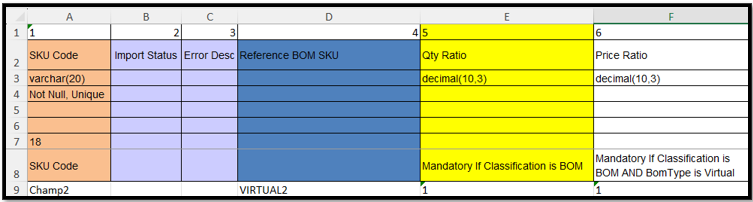
Price Ratio Support for SKU BOM Link Imports
Who Should Care?
Master Data Teams
Inventory Management Teams
Implementation & Operations Teams
Business Challenge
Configuring Price Ratios for Virtual BOM SKUs required users to manually update each SKU through the application, making bulk BOM setup time-consuming and error-prone.
What's New?
The SKU BOM Link Import template now supports the Price Ratio field, allowing users to configure price ratios for Virtual BOM SKUs through bulk import. This enables faster creation and maintenance of BOM configurations without manual screen updates.
Business Impact
✅ Bulk configuration of Price Ratios for Virtual BOM SKUs
✅ Eliminates repetitive manual updates through the UI
✅ Reduces configuration time and data entry errors
✅ Accelerates onboarding and maintenance of Virtual BOM master data
Navigation: Masters >> SKU Management >> SKU Import >> SKU BOM Link
Key Bug Fixes:
Role-Based Customer Name Masking in Order Allocation
Issue
Customer names were visible to unauthorized users on the Order Allocate/Unallocate screen and in exported reports, creating a risk of exposing sensitive customer information.
Fix Implemented
Role-based customer name masking has been extended to the Order Allocate/Unallocate screen as well as its exported reports. The masking behavior is now aligned with the existing Order Enquiry module, ensuring consistent data protection across the application.
Impact
Improved protection of sensitive customer information.
Prevents unauthorized access to customer names in both the application and exports.
Ensures consistent role-based data masking across Order Allocation and Order Enquiry.
Strengthens compliance with organizational data privacy and security standards.
Navigation: WMS>> Order Processing >> Order Allocate/Unallocate

Warehouse Management:
Change Requests/ Enhancements/ Improvements:
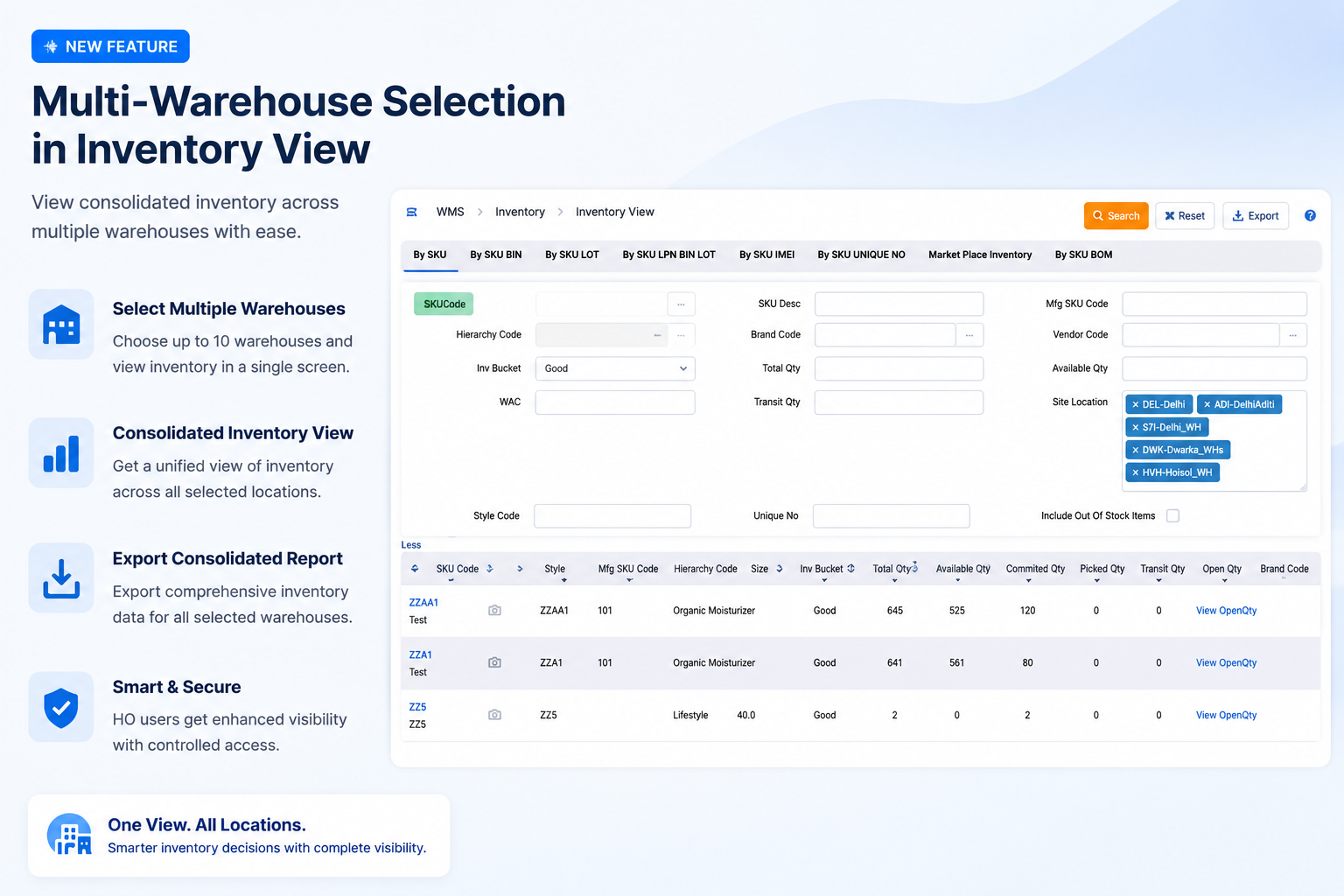
Multi-Warehouse Selection in Inventory View
Who should care?
Head Office Users
Inventory Managers
Supply Chain Teams
Operations Teams
Business Challenge
Head Office users had to generate separate inventory reports for each warehouse, making multi-location inventory analysis time-consuming and inefficient.
What's New?
Inventory View now supports multi-warehouse selection (configurable up to 10 locations) in the By SKU tab, allowing head office users to view and export consolidated inventory data across multiple warehouses from a single screen(configurable).
Business Impact
✅ Single consolidated inventory view across selected warehouses
✅ Reduced manual effort in generating multiple reports
✅ Faster inventory analysis and decision-making
✅ Improved operational visibility for Head Office teams
Navigation: WMS>> Inventory >> Inventory View >> By SKU
Stock Adjustment Export with Date & Time
Who Should Care?
Inventory Controllers
Warehouse Operations Teams
Audit & Compliance Teams
Business Challenge
The Stock Adjustment export displayed only the transaction date, making it difficult to identify the exact sequence of multiple stock adjustments performed on the same day.
What's New?
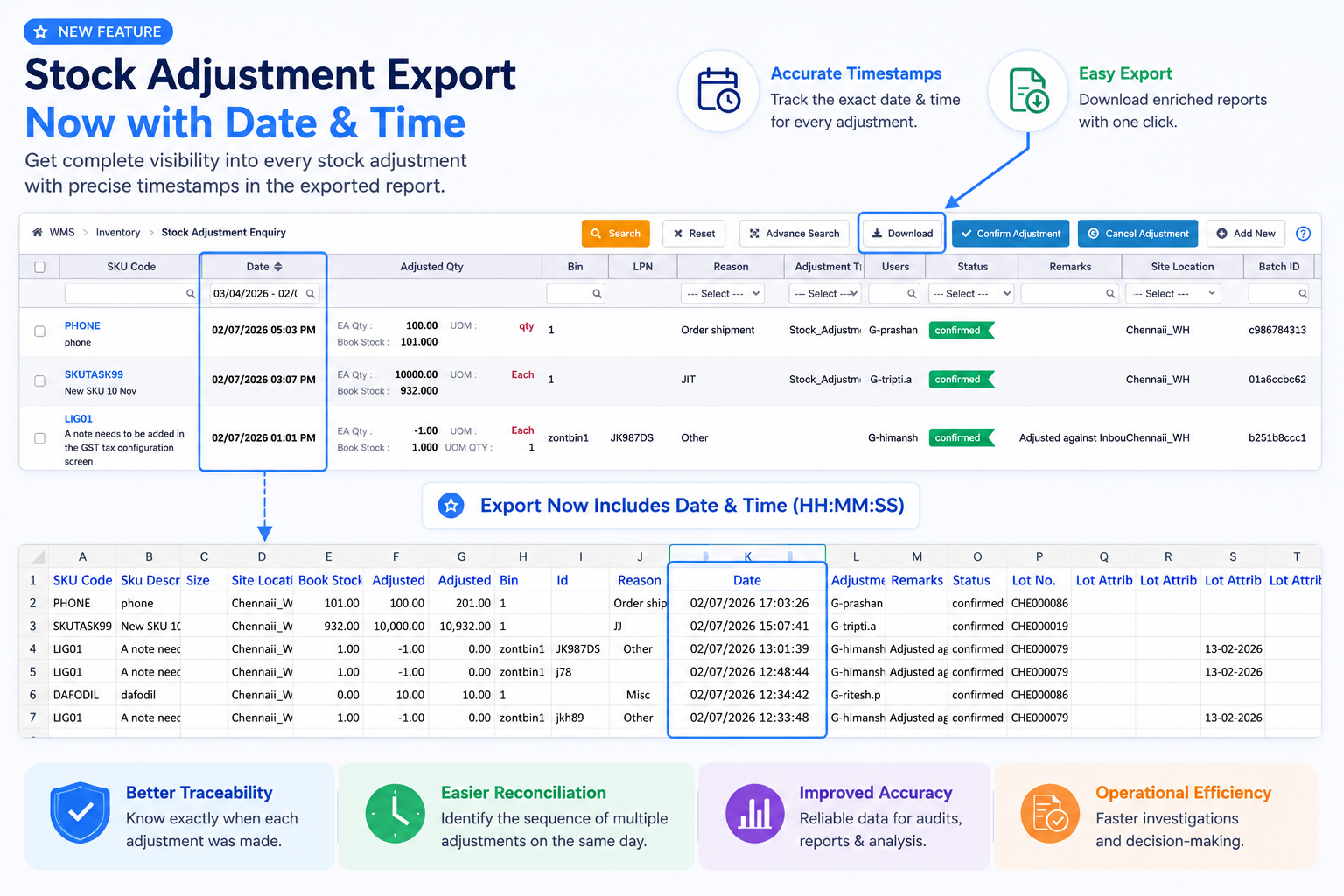
The Stock Adjustment Enquiry Export now includes both Date and Time (HH:MM:SS) for every stock adjustment transaction, providing precise transaction timestamps in the exported report.
Business Impact
✅ Improved audit trail with accurate transaction timestamps
✅ Easier identification of the sequence of stock adjustments
✅ Faster reconciliation and investigation of inventory changes
✅ Enhanced reporting accuracy for inventory operations
Navigation: WMS>> Inventory >> Manage Stock Adjustment
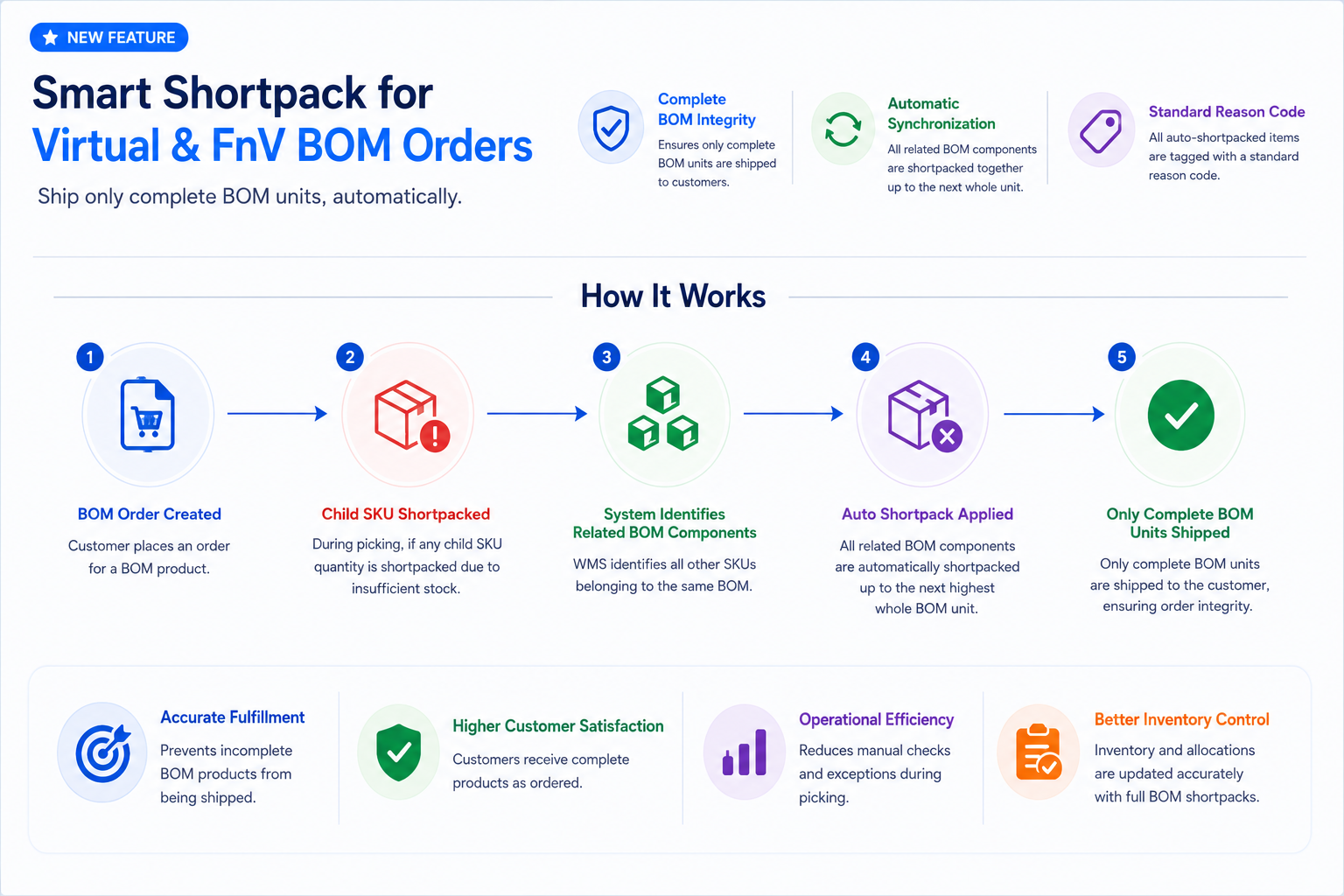
Shortpack Validation for Virtual & FnV BOM Orders
Who Should Care?
Warehouse Operations Teams
Fulfillment Managers
Customer Experience Teams
Business Challenge
During shortpack, the system allowed individual child SKUs of a BOM to be shortpacked independently, resulting in incomplete BOM products being shipped to customers.
What's New?
When any child SKU of a Virtual or FnV BOM is shortpacked, WMS now automatically shortpacks all related BOM components required to maintain complete BOM units. The system also assigns a standard reason code to all auto-shortpacked items, ensuring only complete BOM products are shipped.
Business Impact
✅ Prevents shipment of incomplete BOM products
✅ Automatically synchronizes shortpack across all BOM components
✅ Improves order accuracy and customer satisfaction
✅ Reduces manual intervention during picking and fulfillment
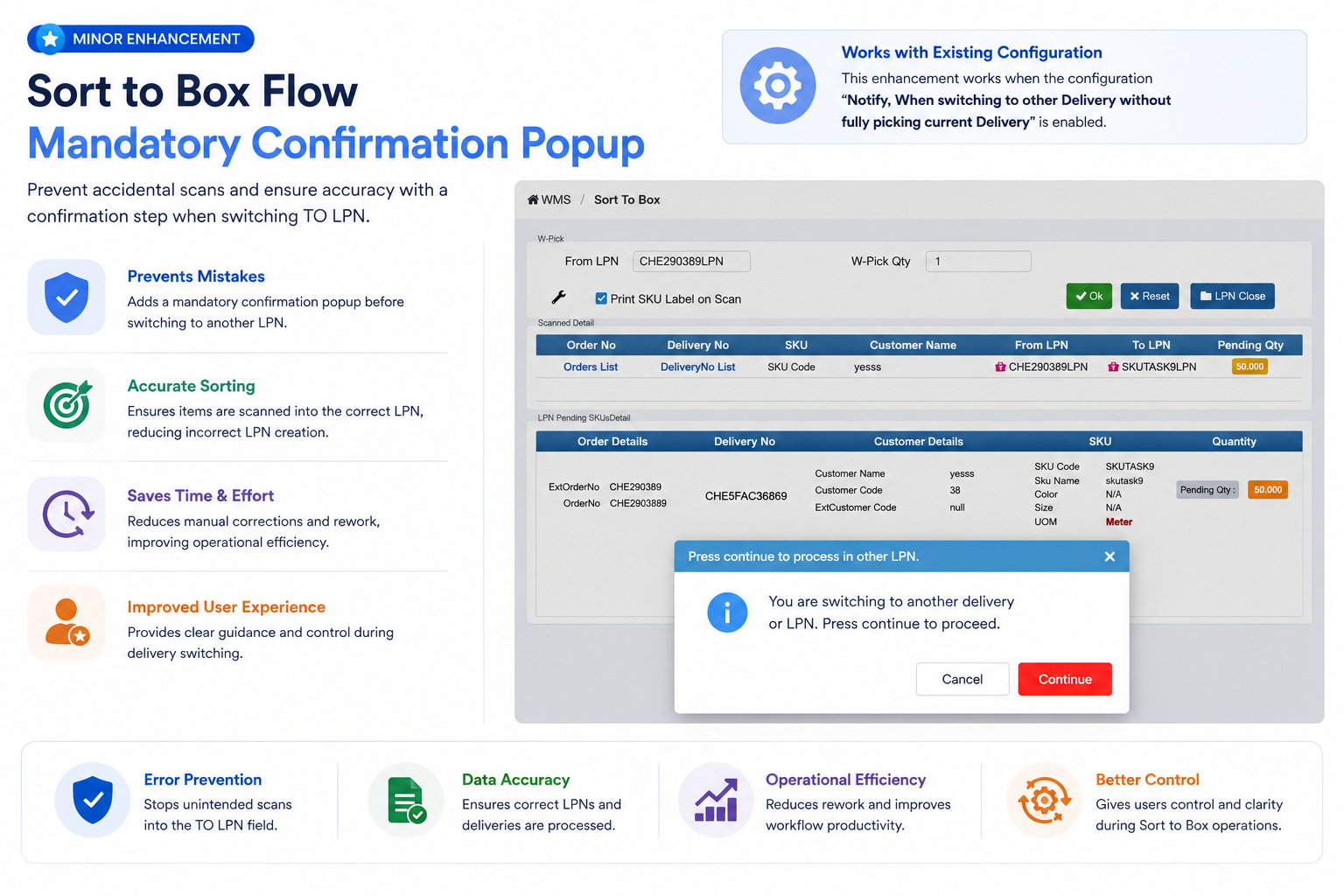
Minor Enhancement: Mandatory Confirmation Before Switching TO LPN in Sort to Box
Who Should Care?
Warehouse Associates
Packing & Sortation Teams
Warehouse Supervisors
Business Challenge
During the Sort to Box process, operators could unintentionally scan an SKU into the TO LPN field after switching deliveries, leading to incorrect LPN creation and additional rework.
What's New?
When the existing "Notify, When switching to other Delivery without fully picking current Delivery" configuration is enabled, WMS now displays a mandatory confirmation popup before allowing users to continue with a different TO LPN. Scanning is blocked until the user explicitly confirms and scans the required TO LPN.
Business Impact
✅ Prevents accidental scans into the TO LPN field
✅ Reduces incorrect LPN creation and manual corrections
✅ Improves accuracy during delivery switching
✅ Enhances operator experience with guided validation
Navigation: WMS>> Order Processing >> Sort to Box
Key Bug Fixes:
Pick Date Missing in Delivery Shipping Export
Issue
For some orders, the Pick Date was missing in the Delivery Shipping export because the system derived the value from order-line information. If the first-order line did not have a Pick Date, the export displayed a blank value even when other lines had been picked.
Fix Implemented
The export now retrieves the Pick Date from the delivery-level information, ensuring a consistent value is displayed for fully picked deliveries. For part-picked orders, the Pick Date will continue to remain blank until the delivery-level Pick Date is available.
Impact
Improved Pick Date accuracy in Delivery Shipping exports.
Eliminates inconsistent Pick Date values caused by line-level data.
Provides more reliable shipping reports for warehouse operations.
Vin FBS (Store Fulfillment App)
Change Requests/ Enhancements/ Improvements:
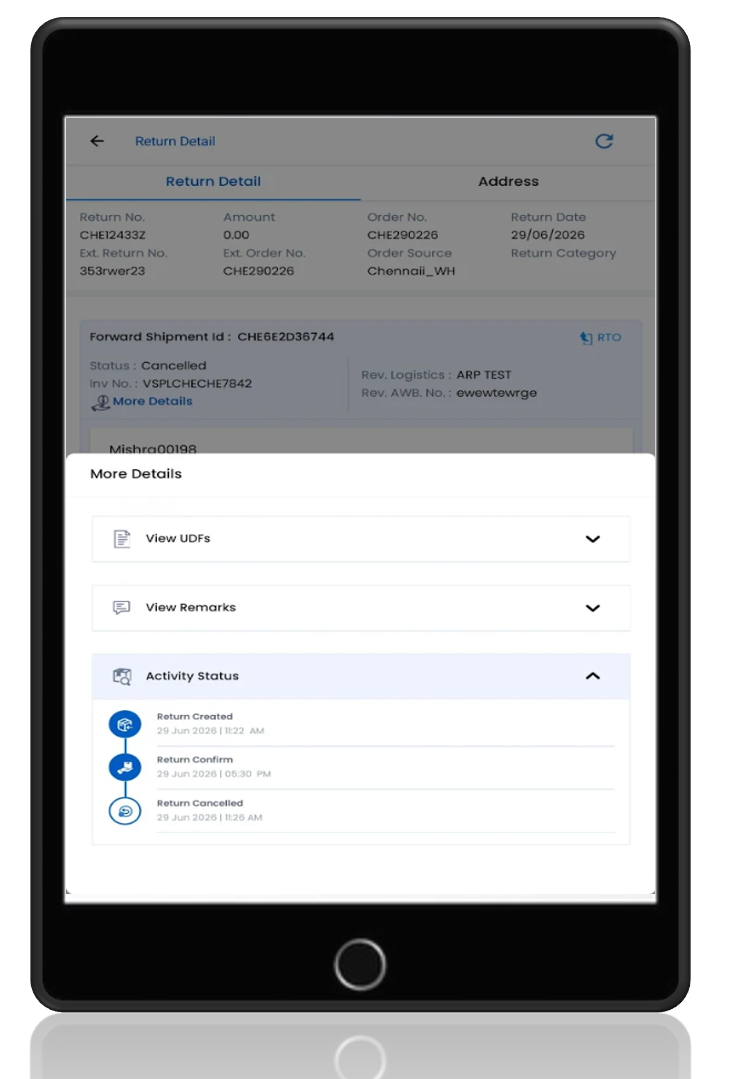
Upgraded Return Detail Page with Activity Status
Who Should Care?
Store Associates
Store Managers
Customer Service Teams
Business Challenge
Users had limited visibility into the progress of return requests, making it difficult to track return activities and monitor the reverse logistics process.
What's New?
Introduced a dedicated Activity Status section on the Return Detail page within the Vin FBS App. Accessible under More Details, this section provides a chronological timeline of return lifecycle events along with their corresponding timestamps, giving users complete visibility into the return journey.
Business Impact
✅ Provides end-to-end visibility into return activities
✅ Enables quick tracking of return status and timestamps
✅ Improves monitoring of reverse logistics operations
✅ Reduces dependency on manual follow-ups for return updates
✅ Enhances transparency and customer service efficiency
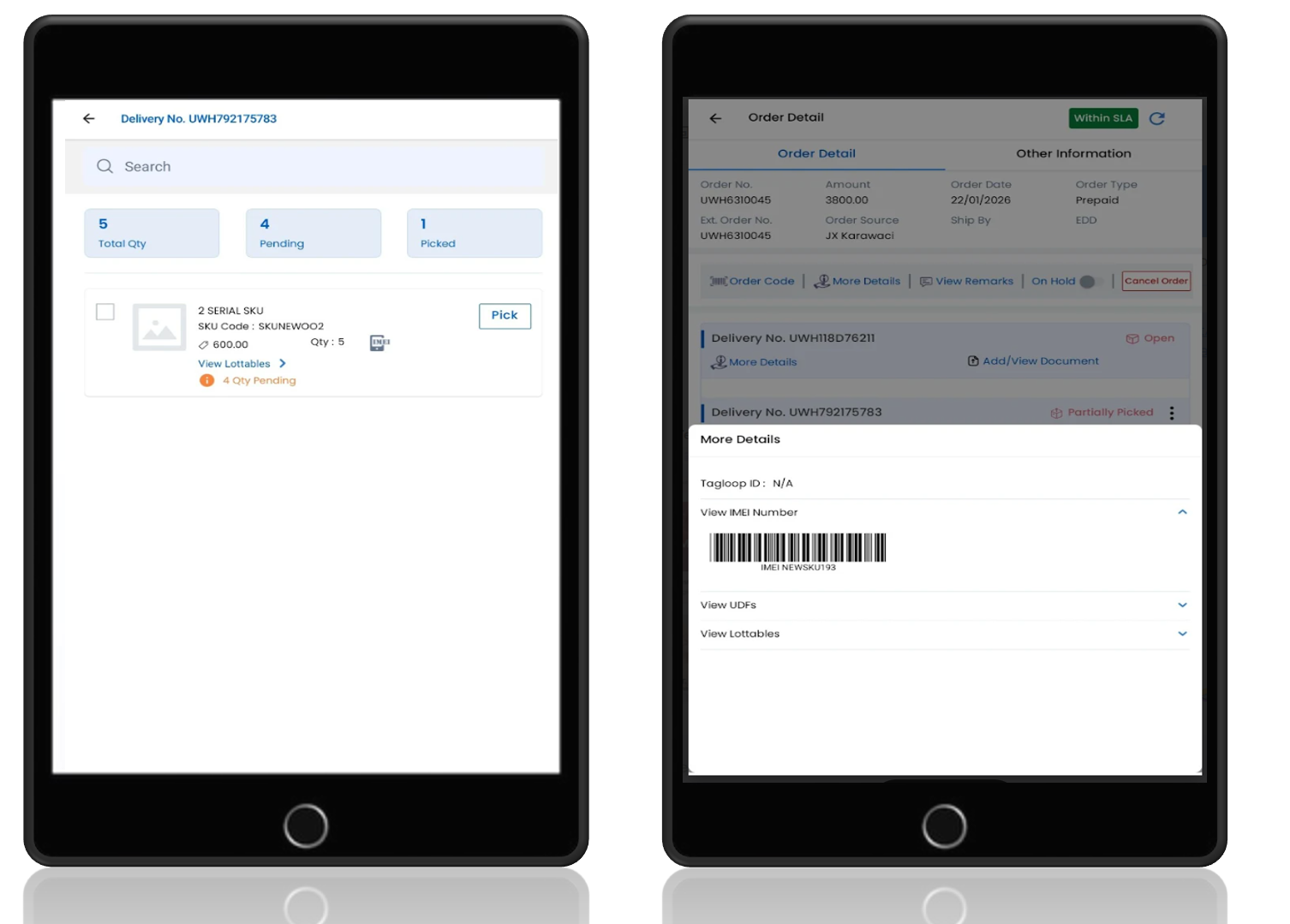
IMEI/Serial Number-Based Order Processing in Vin FBS
Who Should Care?
Store Associates
Warehouse Operations Teams
Fulfillment Teams
Business Challenge
Serialized products require IMEI/Serial Number capture during fulfillment, but the existing picking process lacked an integrated mechanism, increasing the risk of fulfillment errors and manual tracking.
What's New?
The Vin FBS App now supports IMEI/Serial Number scanning directly within the picking workflow. After scanning a SKU, the app automatically prompts for IMEI/Serial Number capture only for serialized products, while non-serialized SKUs continue through the standard picking flow. Captured IMEI/Serial Numbers are also available for reference on the Order Detail page.
Business Impact
✅ Ensures accurate fulfillment of serialized products
✅ Reduces manual errors through item-level IMEI/Serial Number capture
✅ Maintains fast picking for non-serialized products
✅ Improves traceability and visibility of serialized inventory
✅ Enhances operational efficiency without impacting the standard picking workflow
Multi-Client Brand Logo & Theme Support in Vin FBS
Who Should Care?
Store Associates
Warehouse Operations Teams
Multi-Brand Retailers
Business Challenge
Users managing multiple clients within a single Vin FBS App instance found it difficult to distinguish between client workspaces, increasing the risk of processing transactions for the wrong client.
What's New?
The Vin FBS App now supports dynamic client-specific branding, including unique logos and color themes for each client. The app automatically displays the appropriate branding based on the selected client, providing a clear visual distinction across workspaces.
Business Impact
✅ Distinguishes client workspaces with unique logos and themes
✅ Reduces the risk of processing orders for the wrong client
✅ Enhances user confidence in multi-client operations
✅ Delivers a personalized experience for each client
✅ Improves operational accuracy in shared application environments
Vin Endless Aisle
Change Requests/ Enhancements/ Improvements:
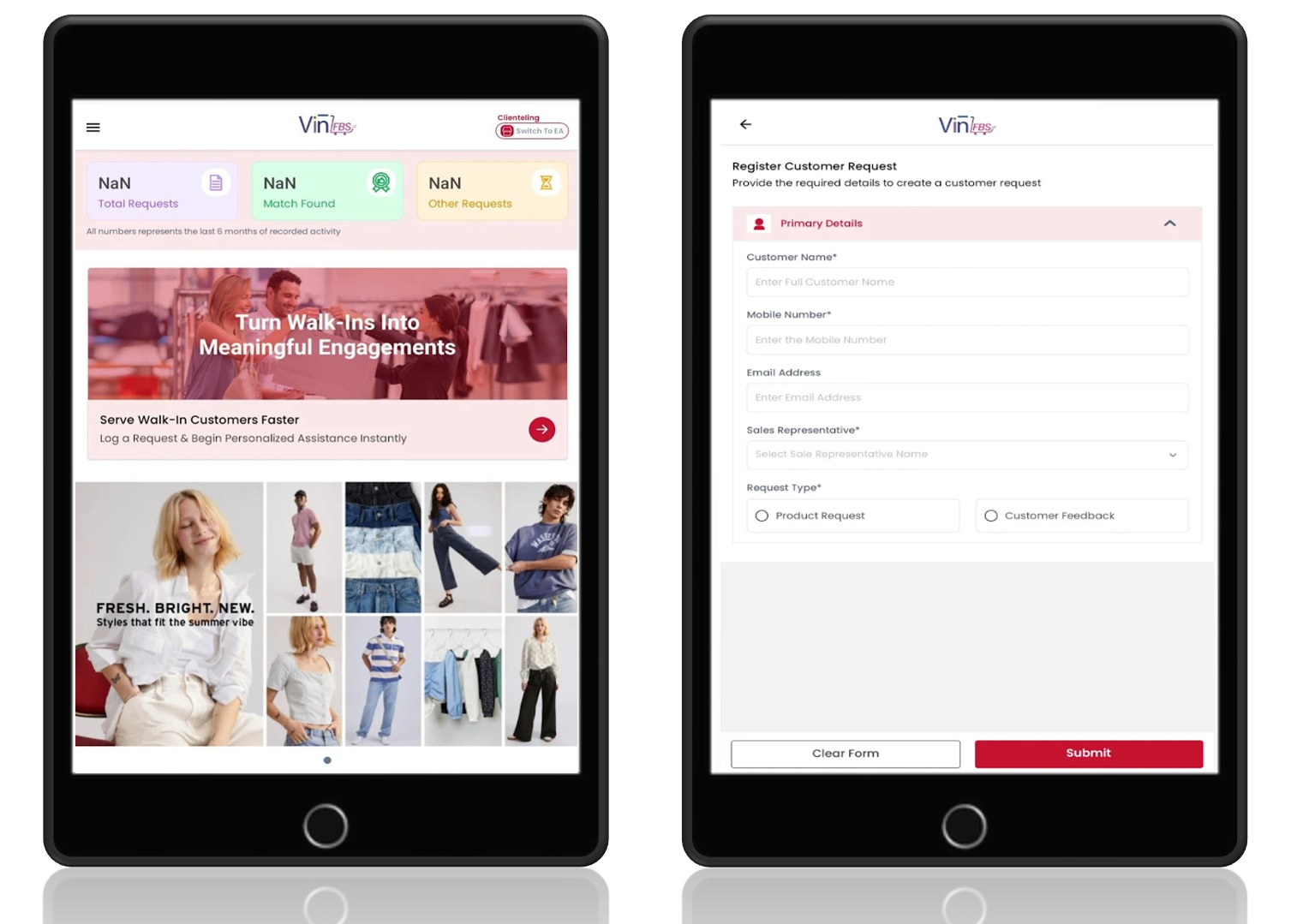
New Clienteling Module
Who Should Care?
Store Associates
Retail Store Managers
Customer Experience Teams
Business Challenge
Store staff had no centralized way to capture customer requests for products not available in the catalog or to track customer feedback, leading to missed sales opportunities and limited follow-up with interested customers.
What's New?
Introduced a dedicated Clienteling Module in the Vin FBS App that enables store staff to capture customer product requests and feedback in one place. The module can be used independently or alongside the Endless Aisle module, with quick access provided through a Clienteling banner. Staff can view all requests, update their statuses, and manage follow-up activities throughout the customer journey.
Business Impact
✅ Capture customer requests for products not currently available
✅ Record and track customer feedback from a single interface
✅ Improve follow-up with customers when requested products become available
✅ Strengthen customer relationships through personalized engagement
✅ Increase sales opportunities by converting unmet demand into future purchases