
Vinculum Release Notes
Version 9.3.183
14th April, 2026
Vin OMS & WMS
Order Management:
Change Requests/ Enhancements/ Improvements:
Enhanced SKU Attributes with Extra UDFs
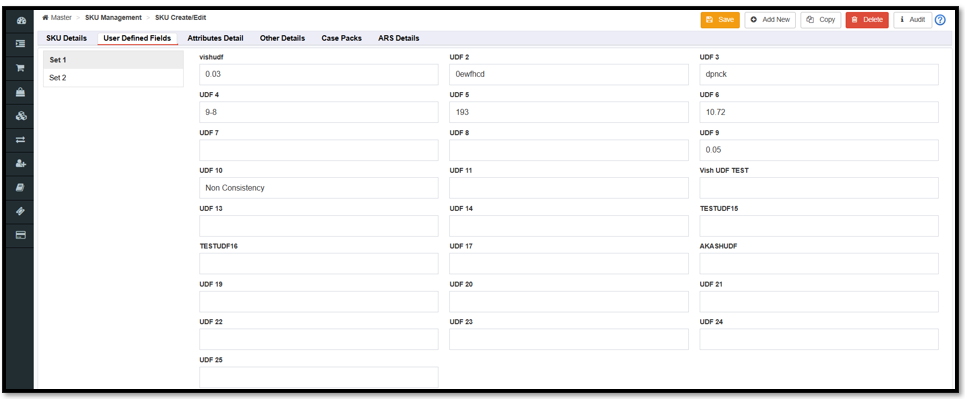
Added additional UDF’s at the SKU level, taking the total UDF count to 25.
Users can now capture up to 25 unique attributes per SKU, allowing for more detailed product data and reporting.
New attributes are fully supported across APIs, ensuring that third-party integrations can sync extended product data without manual intervention.
Navigation: Vin e-Retail >> Master >> SKU Management >> SKU Create/Edit
Introduced Payment Details for Return Order
Added a new payment details tab for return ensuring return and payment tender information is accurately captured and synchronized during the return process.
Users can now capture returns payment details that involve multiple payment methods, providing better flexibility for complex financial transactions.
Navigation: Vin e-Retail >> Return & Transfers >> Return Create/Edit

Enhanced User Master Export with Create and Update Fields
The User Master export now includes four additional columns: Created Date, Created By, Updated By, and Updated Date.
By adding Create and Update attribute data, the system offers a more secure environment where all administrative actions are traceable, providing immediate visibility into user management activities.
Navigation: Vin e-Retail >> Admin >> User Enquiry >> Export
Key Bug Fixes:
Enhanced Data Validation for Order Creation
The Order Creation now includes a mandatory check for the quantity field at the line-item level. Line items containing items with 0 quantity will now be restricted. Logic has been implemented to ensure that only orders with valid, non-zero line items are created.
Users will no longer see invalid, zero-quantity items in system, reducing confusion during order processing and reporting
Warehouse Management:
Change Requests/ Enhancements/ Improvements:
QC Inventory Tracking & Movement from Staging
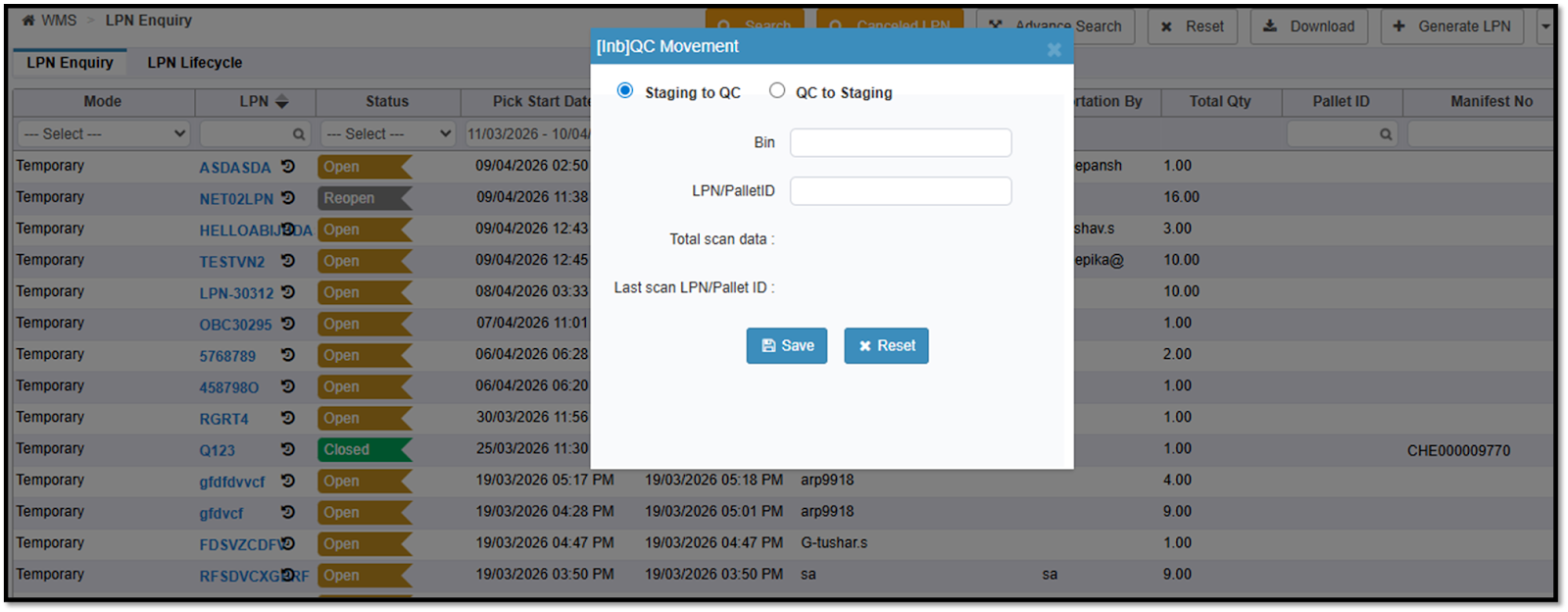
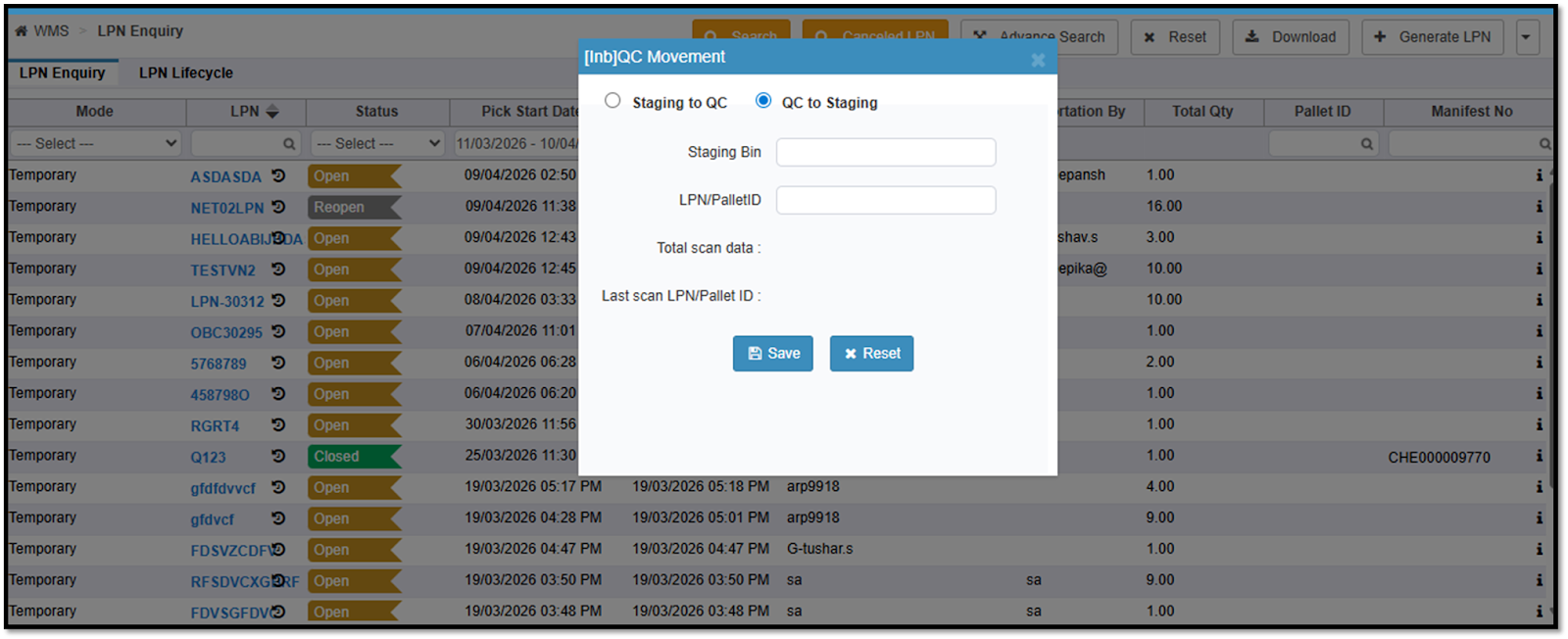
Introduced a system-driven process to move inbound inventory (LPN/Pallet) between Staging and QC bins.
Added “QC Movement” option in both Web (LPN Enquiry) and Mobile App (Receiving module).
Enabled two movement flows:
Staging → QC (for quality check processing)
QC → Staging (post QC completion)
Implemented bin type validations to ensure movement only to valid QC or staging bins.
Provided scan-based LPN/Pallet movement with real-time visibility (total scans & last scanned LPN).
Enabled putaway directly from QC bins without disrupting standard putaway rules.
Benefits
Improved Inventory Visibility: Real-time tracking of QC inventory at LPN/Pallet level.
Process Control: Ensures structured and system-driven QC movement instead of manual/external handling.
Error Reduction: Validations prevent incorrect bin usage and misplacement of inventory. Operational Efficiency: Faster QC segregation and seamless movement via web and mobile.
Flexibility in Operations: Supports reverse movement (QC → Staging) for reprocessing scenarios.
Seamless Integration: Works within existing inbound and putaway flows without impacting current logic.
Navigation: WMS >> Miscellaneous >> LPN Enquiry
SKU-Level Scan Mode Control (Bulk vs Each)
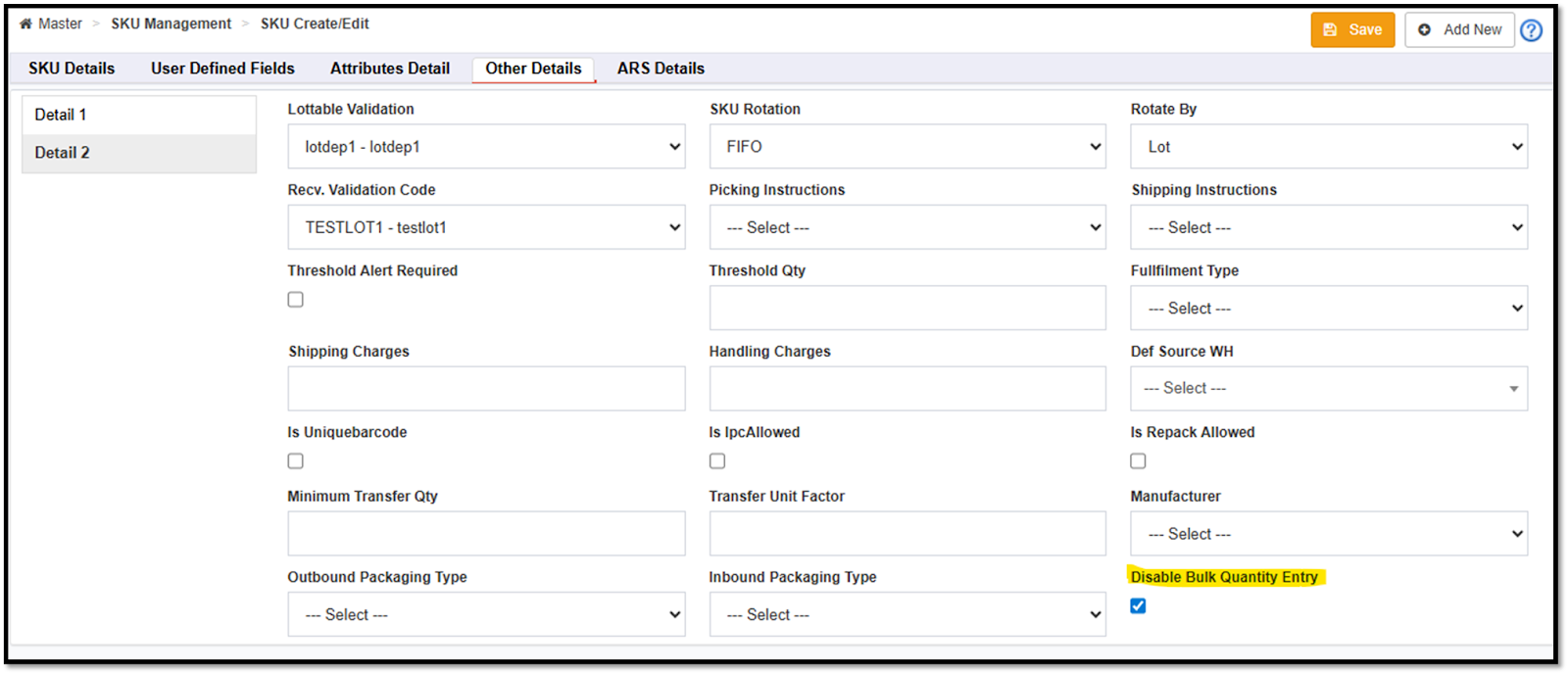
A new “Disable Bulk Quantity Entry” option in the SKU Master.
Enabled SKU-level control to restrict scan mode:
If enabled → Only Each scanning is allowed.
If disabled → Both Bulk and Each scanning allowed as per existing settings.
The system will auto-restrict the quantity to 1 when a bulk scan is attempted for restricted SKUs.
Applied across all key warehouse operations: Inbound, Putaway, Picking, Sorting, Inventory Move, Cycle Count, Letdown, Pack Scan.
Extended support via APIs and Import for SKU create/update.
Benefits
Improved Accuracy: Prevents incorrect bulk scanning for sensitive or serialized SKUs.
Better Process Control: Enables SKU-specific scan behavior based on business needs.
Errors: Eliminates quantity mismatches caused by unintended bulk entries.
Operational Consistency: Ensures uniform scan logic across all warehouse processes.
Flexible Configuration: Works alongside existing scan settings without impacting current flows.
Navigation: WMS >> SKU Management >> SKU Create/Edit
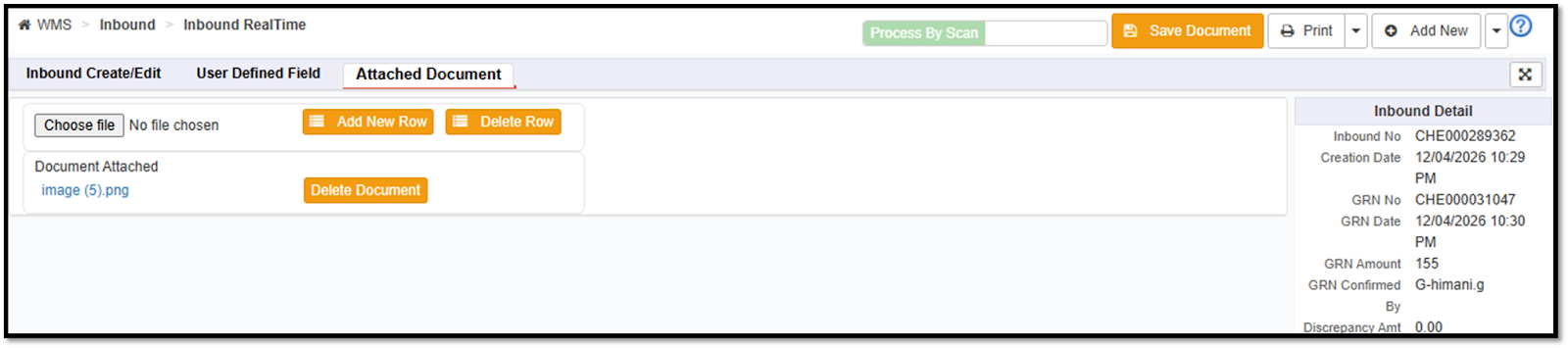
Document Attachment in GRN In-Process Status
Users can now attach documents during the GRN In-Process stage in inbound.
A new “Save Document” button is introduced on the inbound screen when the status is GRN In-Process.
Attachments are securely stored and linked to the respective inbound record.
Supported across both Process by Scan and Process by Table flows.
Navigation: WMS >> Inbound >> Inbound Real Time
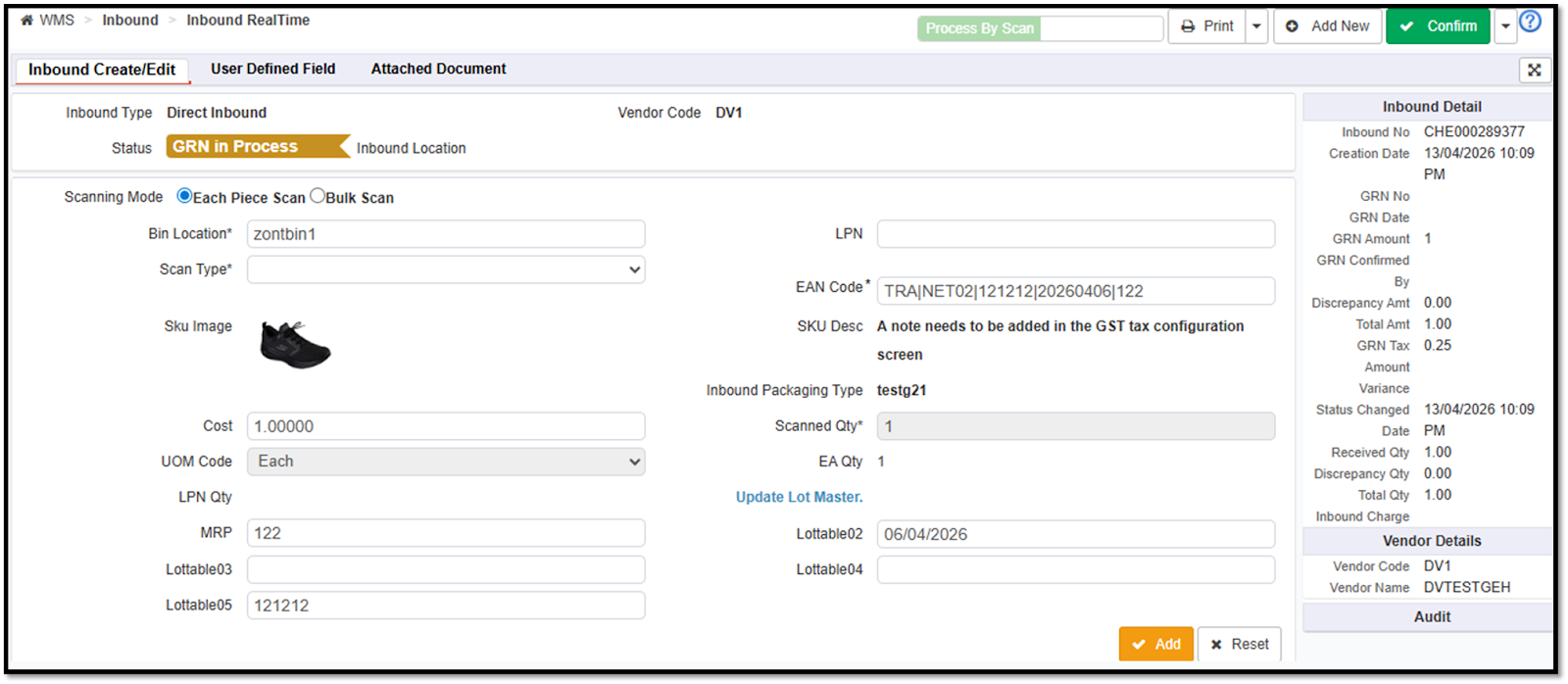
Dual Scanning Support (EAN + QR Code with EXTLOTNO)
The system now supports simultaneous scanning of the EAN and the QR Code (EXTLOTNO).
QR codes mapped to lot attributes (EXTLOTNO) can be scanned directly in the SKU field.
Automatic SKU and lot details identification upon scanning QR codes.
Configurable validation using config based functionality (prefix, suffix, regex, SKU mapping).
Applicable across all major warehouse operations, including:
Inbound
Inbound QC
Putaway
Picking, Packing & Sorting
Inventory Movement
Stock Adjustment
Cycle Count
Benefits
Eliminates the need to relabel existing inventory, saving significant time and effort.
Supports mixed inventory environments (with and without QR codes).
Improves scanning flexibility for products where QR labeling is not feasible.
Enhances operational speed and accuracy with auto-capture of SKU and lot details.
No disruption to existing barcode workflows, ensuring seamless adoption.
End-to-end traceability is maintained across inbound and outbound processes.
Standard APIs
Change Requests/ Enhancements/ Improvements:
Order creation using External Customer Code
A new param extCustomerCode has been added in order create api allowing order creation using extCustomer. This update removes the dependency on internal Vinculum customer codes, allowing external systems to create orders using their own identifiers.
Provides a more versatile API structure that caters to the specific data-handling preferences of different ERP and POS systems.
API Touchpoint: /RestWS/api/eretail/v1/order/create
New Fields in Inbound Details API
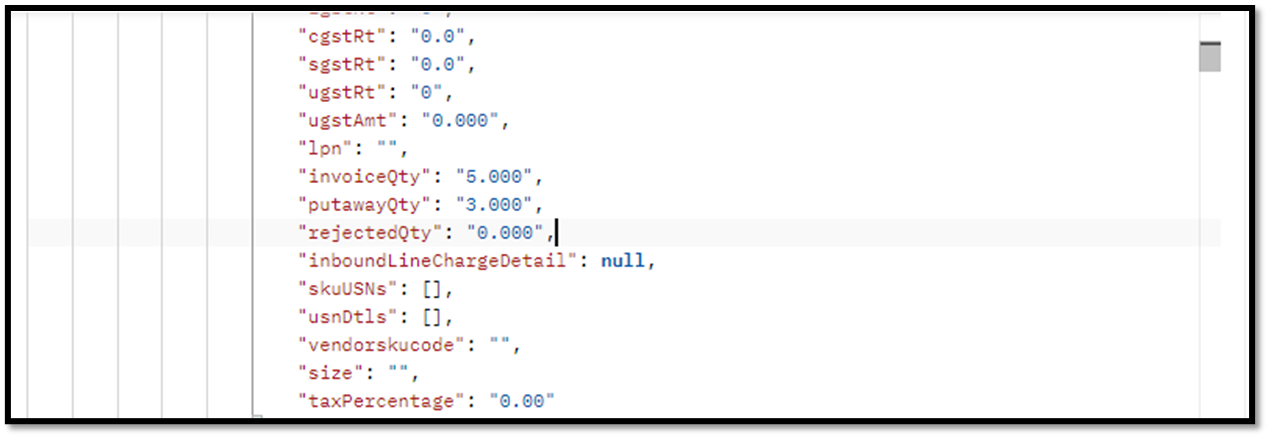
Added two new fields in Inbound Details API (V1 & V3) at the line level -
rejectedQty
putawayQty
No changes to existing request parameters.
Available across both API versions: /v1/inbound/detail /v3/inbound/detail
Key Benefits
Enhanced Visibility: Provides clear insight into rejected and putaway quantities directly via API.
Better Inventory Tracking: Enables accurate monitoring of QC outcomes and putaway status.
Improved Integrations: External systems (ERP, reporting tools) can now consume detailed inbound status without additional logic.
Reduced Manual Effort: Eliminates the need for separate calculations or data extraction for reject/putaway quantities.
End Points - /RestWS/api/eretail/v1/inbound/detail
/RestWS/api/eretail/v3/inbound/detail
Financials/ E-filing Systems Integrations:
Change Requests/ Enhancements/ Improvements:
Accurate Item Name Display and Rate Correction
Replaced the SKU Code with the SKU Name in sales return. Resolved an issue where Credit Notes (CN) were generated with a zero sales price. The rate parameter is now correctly included in the API request to apply the accurate sales rate to returns.
Enhanced the integration logic to ensure these sales return adjustments are reflected accurately within ZohoBooks.
Financial discrepancies are eliminated by ensuring Credit Notes are generated with the correct item rates rather than zero values.
Improved Data Traceability in Accounting Exports
Correct data values are now reflected in zohobooks exports to focus on data accuracy and better visibility of key identifiers required for accounting audits.
Unified document headers across all transaction types of exports of ZohoBooks to provide a consistent report format for accounting teams managing multiple transaction types.
The export report has been formally renamed to ZohoBooksExport in the Pending Reports section for easier identification.