
Provisional Vinculum Release Notes
Version 9.3.181
10th February, 2026
Vin OMS & WMS
Order Management:
Change Requests/ Enhancements/ Improvements:
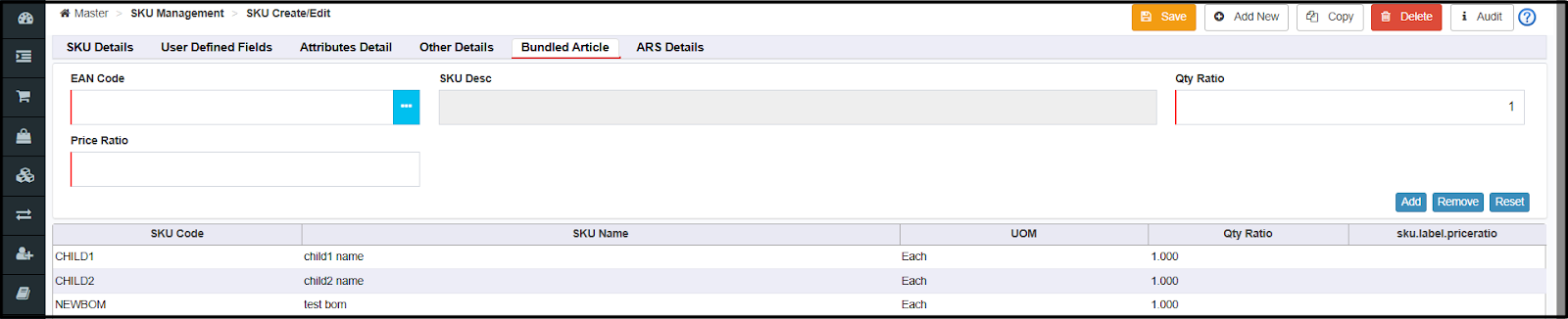
Support for Linking Physical BOMs Inside Virtual BOMs
Physical BOMs can now be linked as components within Virtual BOMs, enabling reuse of existing Physical BOM definitions as components instead of recreating complex structures for Virtual BOM-based combos.
This enhancement ensures accurate stock depletion across the BOM hierarchy while reducing configuration complexity, eliminating duplicate BOM maintenance, and improving real-time inventory visibility for better order fulfillment.
Navigation: Master >> SKU Management >> SKU Master >> SKU Create/Edit
Nearest Location Routing for Return Orders
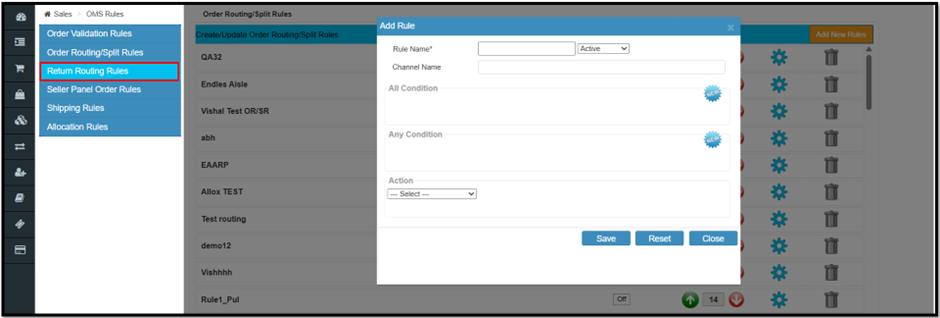
Return orders can now be routed to the nearest eligible location based on the customer’s pincode or any specific location defined using newly added Return Routing Rules on the OMS rules screen, instead of always returning to the original dispatch warehouse.
This reduces return transit time and reverse-logistics costs while enabling faster refunds and exchanges and improving overall profitability.
Navigation: Sales >> OMS Rules >> Return Routing Rules
Pre-Pack Restriction for Tagloop-Enabled Marketplace Orders
The system now restricts pre-pack and auto-prefetch for Tagloop-enabled marketplace orders, preventing non-compliance scenarios where Tagloop is enabled but pre-pack remains active, which previously caused Tagloop details to not be passed to the marketplace.
This enhancement reduces the risk of SPF (Seller Protection Fund) claim rejections by ensuring Tagloop compliance requirements are met, protecting sellers from financial losses due to missing or incomplete Tagloop documentation during order fulfillment.
RSP-Based GST Calculation Enhancement (Effective Feb 1st, 2026)
As per the latest GST notifications, tax for notified goods is now calculated on the Deemed Value derived from the Retail Sale Price (MRP), replacing the earlier Selling Price (Transaction Value)–based computation.
Tax computation across all modules: Sales Orders, STO, PO, Inbound, RTV, and integrated e-invoice/e-way bill workflows are now updated to calculate Statutory Tax Amount and Taxable Value strictly per new RSP-based rules, preventing GSTN portal validation errors, invoice mismatches, and compliance penalties during e-invoice generation and filing processes.
Warehouse Management:
Change Requests/ Enhancements/ Improvements:
Picklist Generation based on max cubic volume per order
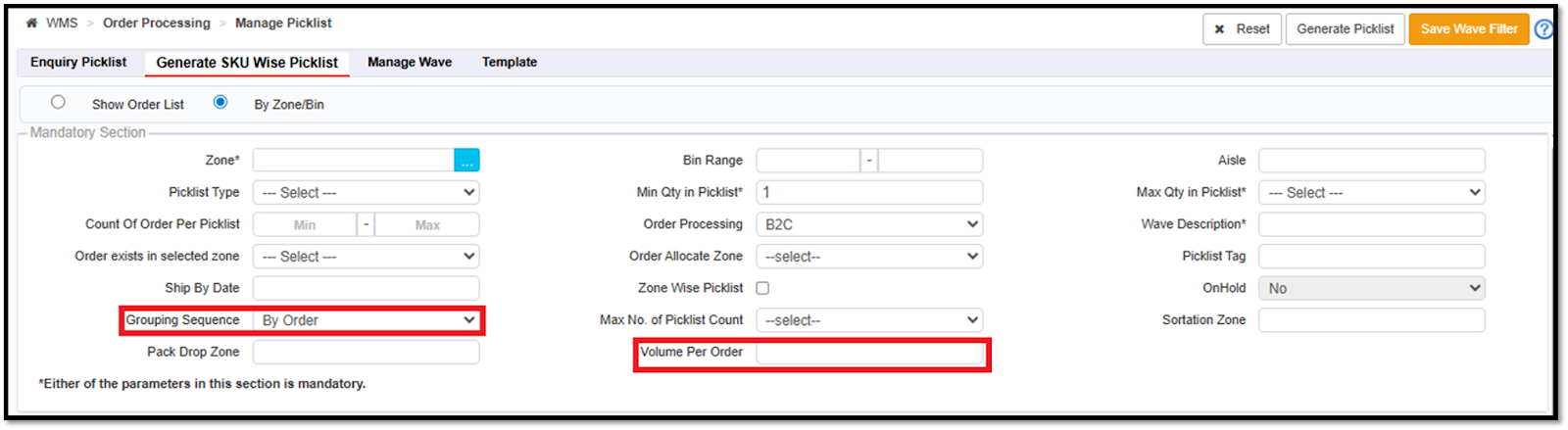
A new enhancement enables picklist generation based on a defined maximum cubic volume at the order level.
A new input field, “Volume Per Order,” has been added to the Picklist Generation screen (By Zone / By Bin).
This feature is applicable only when the grouping sequence is set to By Order.
The system calculates the total order volume as the sum of (SKU Length × Breadth × Height × Quantity) across all order lines.
This enhancement applies to picklist generation flows using the By Zone/Bin options.
Navigation: Wms >> Manage Picklist
Return Type, Channel Type, and Transporter filter on -Inbound Real Time- Bulk RTO/Delivered Return
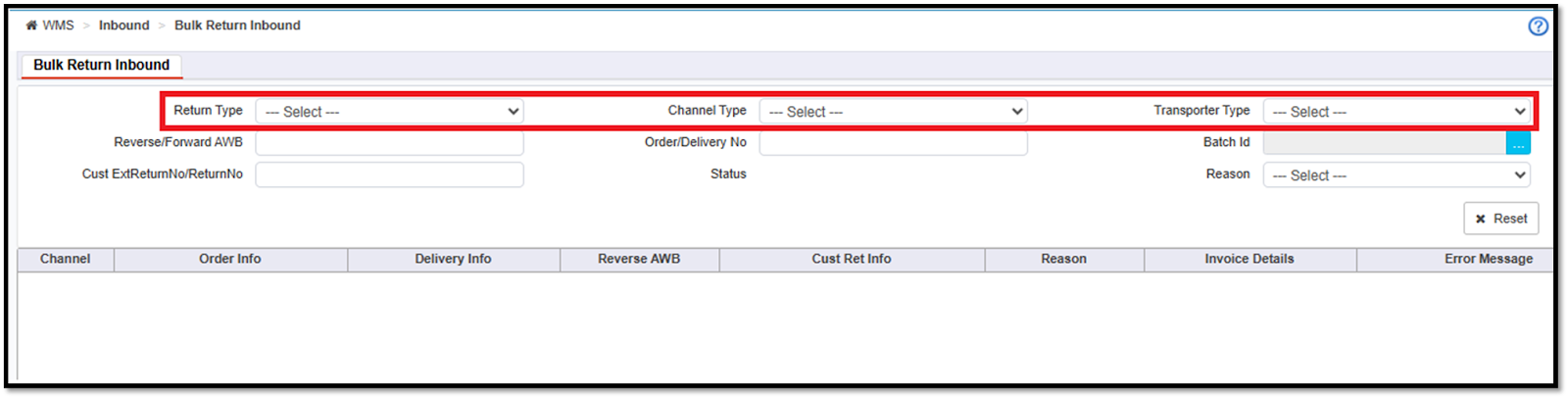
This release introduces the ability to segregate DTO and RTO returns during bulk return creation.
Users can now select the return type (RTO or Delivered Return) before creating a return inbound, with optional filters for channel type and transporter.
This ensures proper QC handling, as QC is mandatory for DTO returns and not required for RTO returns.
If no filters are selected, the system will continue to behave as it does today.
Navigation: Wms >> Inbound Real Time
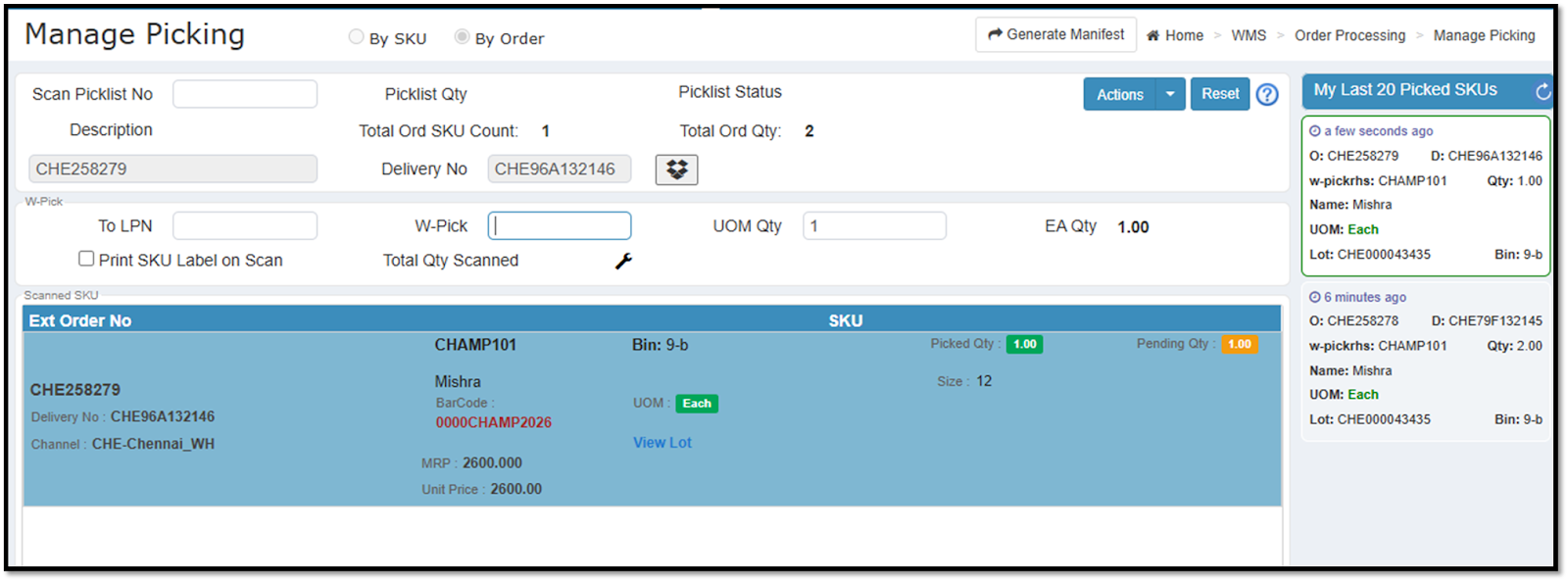
Displaying the scanned EAN Code at the manage picking screen
A new enhancement has been introduced on the Manage Picking screen to improve item identification during the pack scan process by displaying the EAN code and visually highlighting scanned line items.
The EAN code of the scanned item is now displayed on the Manage Picking screen.
Visual Indicators
The last scanned SKU will automatically move to the top of the list and be highlighted in blue.
Items for which all quantities have been pack-scanned will be highlighted in green.
Items with partial pack scanning completed will be highlighted in yellow.
Unscanned items will continue to appear in alternating white and grey for better readability.
Navigation: Wms >> Manage Picking
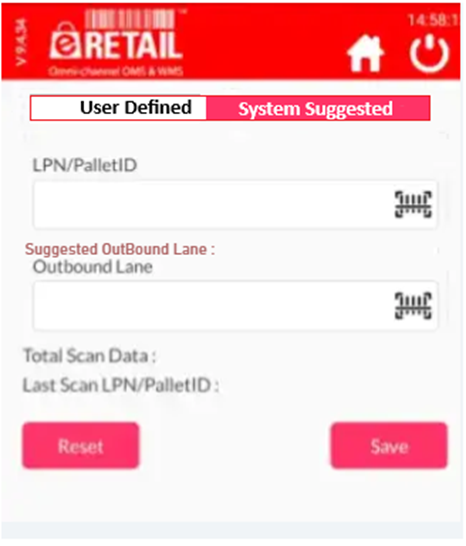
Enhancement in Outbound Lane
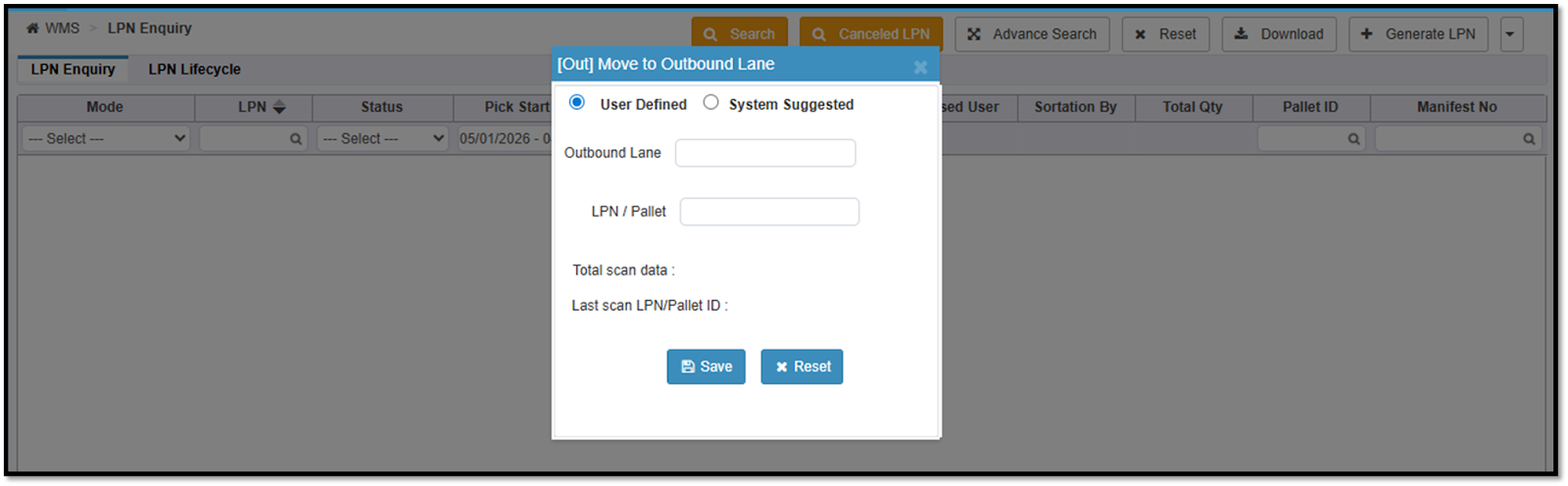
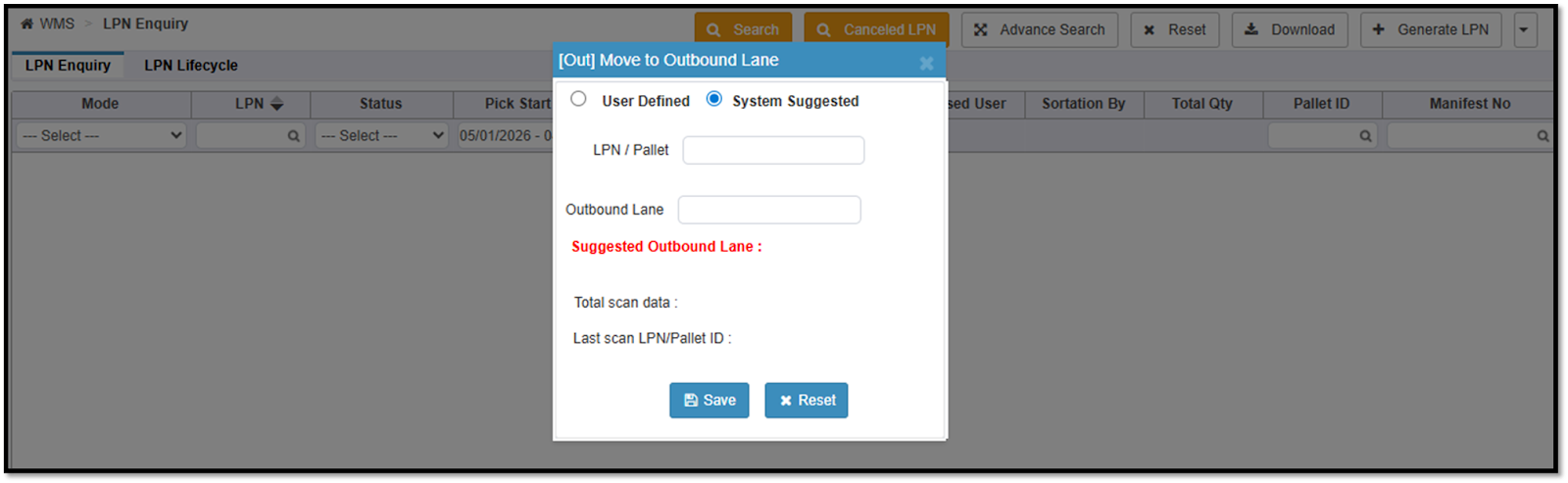
We have introduced an enhancement that enables system-suggested outbound lane assignment for LPNs. This reduces manual effort and ensures consistency while assigning outbound lanes.
A new option is introduced to choose between:
User Defined Outbound Lane
System Suggested Outbound Lane
These options are controlled via user rights.
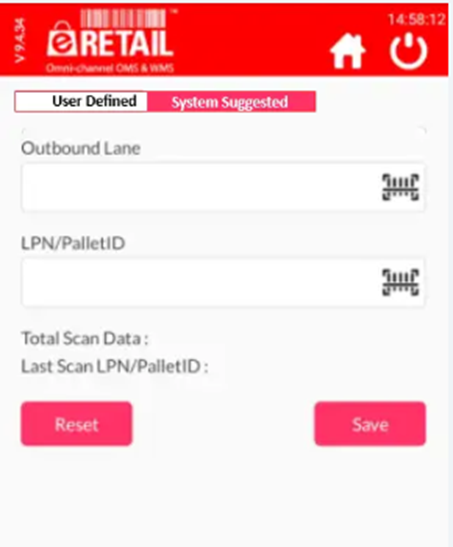
This enhancement is available on both Web and App.
User-defined outbound Lane
User-defined will work the same as it does today, no change in that.
System suggested OutBound Lane
The scanning flow has been updated: Users will first scan the LPN/Pallet, followed by the Outbound Lane.
For both user and system suggest the outbound lane, for the new delivery LPN , users must have to input the lane manually.
For subsequent LPNs belonging to the same delivery, the system will automatically suggest the previously used outbound lane.
When the system suggests an outbound lane, it is auto-populated in the Outbound Lane field with the cursor enabled, allowing users to edit if required.
If a user modifies the auto-suggested outbound lane, the system will remember the updated lane.
For subsequent Delivery LPNs of the same order, the system will auto-suggest the last entered outbound lane.
Navigation: Wms >> Miscellaneous >> Lpn Enquiry
Navigation: B2B >> Order Processing >> outboundLane
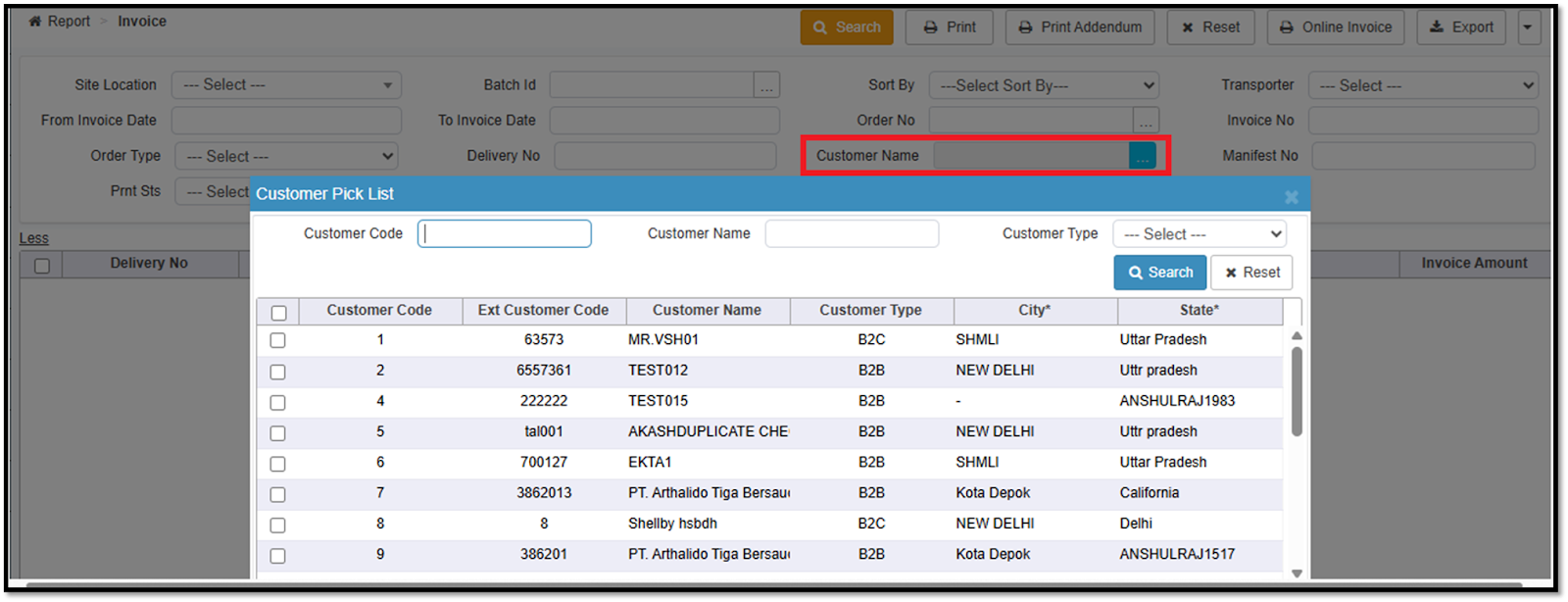
Invoice Report Customer Filter Enhancement
The Invoice report screen has been enhanced to simplify customer selection and improve search efficiency by introducing a multi-select customer picklist.
Replaced the free-text customer search with a customer picklist popup.
Users can select multiple customers using checkboxes and click OK to view invoices for all selected customers in a single search.
A maximum of 10 customers can be selected at one time.
Benefits:
Eliminates the need to remember exact customer names.
Enables faster and more accurate invoice searches.
Allows viewing invoices for multiple customers in one go, improving reporting efficiency.
Navigation: Report >> Invoice
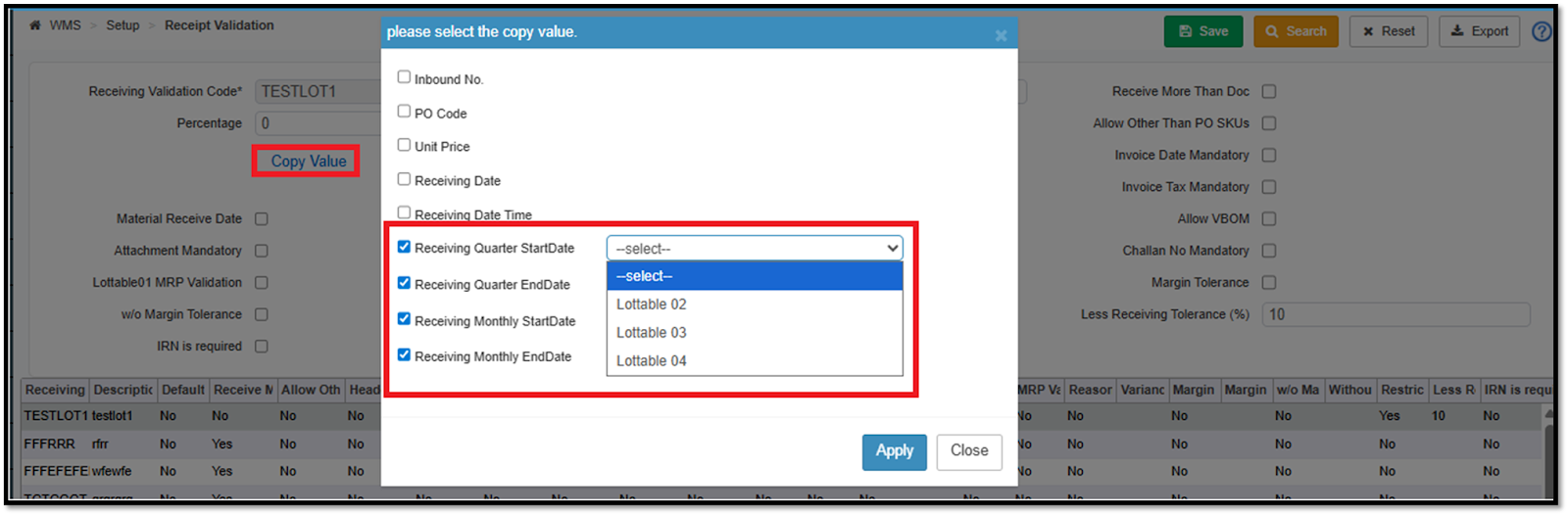
Receipt Validation Enhancement
To improve lot consolidation and optimize bin utilization, the receipt validation process has been enhanced.
We have introduced four new options under Copy Values to Lottable:
Receiving Monthly Start date
Receiving Monthly End date
Receiving Quarter Start date
Receiving Quarter End date
If the Start Date is selected, at the time of inbound, the system will capture the start date of the corresponding quarter or month of the receiving Date and copy it to the lottable as per receipt validation.
If the End Date is selected, at the time of inbound, the system will capture the end date of the corresponding quarter or month of the receiving Date and copy it to the lottable as per receipt validation.
Navigation: WMS >> Receipt Validation
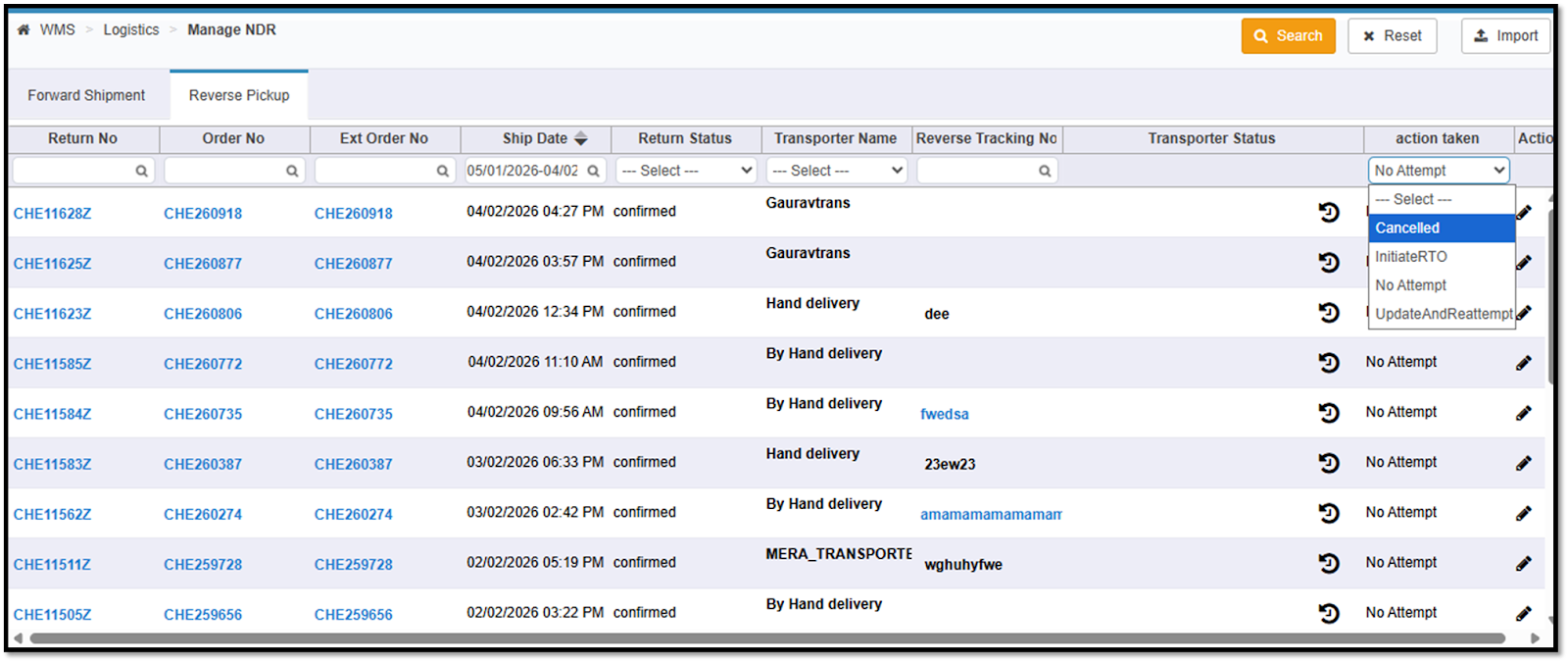
Action Taken Tracking in Manage NDR
Introduced a new “Action Taken” field on the Manage NDR screen.
Available for both Forward Shipments and Reverse Pickups.
Displays the latest action performed by the user or delivery partner on an NDR case.
Action Taken Values are -
Cancelled
Initiate RTO
Update and Reattempt
No Action Taken (blank when no action is performed)Cancelled
Users can now filter NDR records based on Action Taken.
Works seamlessly with existing filters:
Delivery / Return Status
Transporter Name
Search functionality
Benefits:
Clear segregation of NDR cases into pending vs actioned records.
Improved visibility into follow-up status for non-delivered shipments.
Reduced operational confusion by eliminating manual tracking of handled NDRs.
Faster decision-making with targeted filtering of unresolved cases.
Consistent experience across forward and reverse shipment flows.
Navigation: WMS>> Logistics >> Manage NDR
Restrict Less Than Document Quantity Validation for ASN Inbound
Extended the “Restrict Less Than PO” receipt validation to work for all ASN types, not just PO-based inbounds.
The validation has been renamed to “Restrict Less Than Doc Qty” to reflect its broader applicability.
Applicable for inbound against:
Vendor
Customer
Marketplace
PO(existing behaviour)
For users with override permission, inbound no longer proceeds immediately.
Instead, a confirmation pop-up is displayed with two options:
Confirm – Override the validation and proceed with inbound
Cancel – Discard the inbound transaction
This confirmation flow is applied consistently for: All ASN-based inbounds.
Benefits:
Consistent receiving validation across PO and non-PO ASN flows.
Improved control over short receipt scenarios for marketplace and vendor ASNs
Reduced operational blockers with a controlled override mechanism.
Better auditability and process compliance through explicit user confirmation.
ErrorSuccess Message Color and Font Size Change in the App
Enhanced the UI to improve differentiation between success and error messages.
Success messages will now be displayed in green for better visibility.
Error messages will now be displayed in light red, with a slightly increased font size to improve readability.
This enhancement applies to the mobile application.
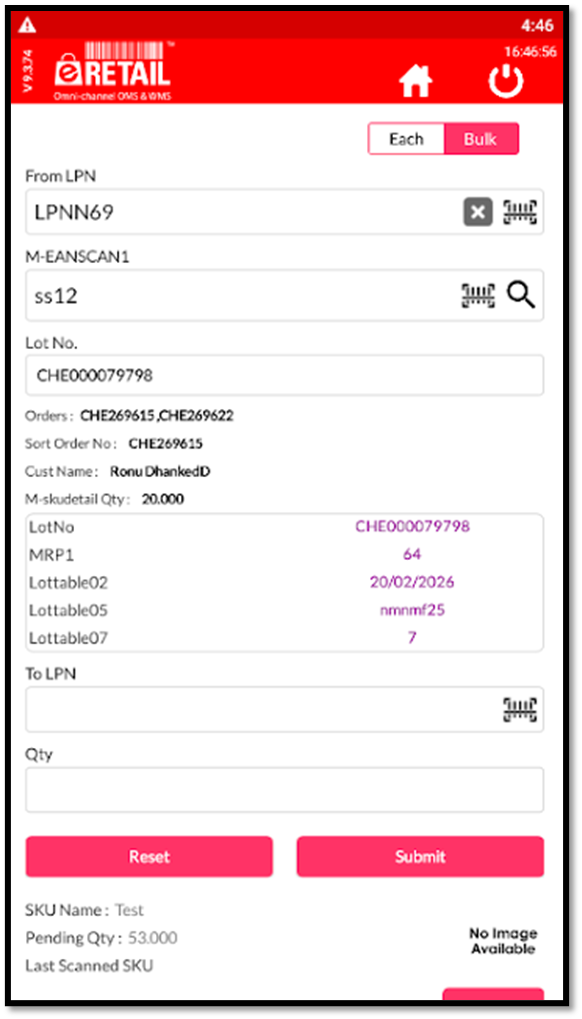
Lot Details Visibility in Sort to Box (B2B) - WMS App
Lot details are now displayed directly on the Sort to Box screen in the WMS Mobile Application.
Applicable for B2B order flows.
Lot information will be shown under SKU details during sortation.
The system will now always display: Lot Number Associated Lottable values (Lottable1, Lottable2, Lottable3, etc.)
The existing lot selection for multiple lots, the pop-up will continue to appear.
After lot selection, the selected lot details will be displayed on the main Sort to Box screen.
Navigation: Picking >> Picklist Sortation & Move >> Sort to Box
Financials/ E-filing Systems Integrations:
Change Requests/ Enhancements/ Improvements:
Tax ID Mapping Update for Zoho Item Creation
The ZohoBooks tax configuration has been enhanced to pass the Tax ID under Tax Preference, ensuring correct tax application on items for both intra-state and inter-state transactions.
This reduces manual tax corrections in Zoho for newly created items and minimizes the risk of reporting discrepancies and downstream financial mismatches caused by incorrect tax rates.
Navigation: Logs >> Accounting Log >> ZohoBooks >> Item
