
Vinculum Release Notes
Version 9.3.180
20th January, 2026
Vin OMS & WMS
Order Management:
Change Requests/ Enhancements/ Improvements:
AWB Links Now Generate Clean, Functional URLs for Shipment Tracking
Corrected the tracking link formation logic to create a functional transporter tracking URL across all screens and APIs to ensure consistency.
AWB tracking links now work seamlessly without requiring manual URL correction, enabling users to track shipments directly from the system to access real-time tracking information from Aramex, FedEx, DHL, and other couriers without encountering broken links.
RSP-Based GST Calculation Enhancement (Effective Feb 1st, 2026)
As per the latest GST notifications, tax for notified goods is now calculated on the Deemed Value derived from the Retail Sale Price (MRP), replacing the earlier Selling Price (Transaction Value)–based computation.
Tax computation across all modules: Sales Orders, STO, PO, Inbound, RTV, and integrated e-invoice/e-way bill workflows are now updated to calculate Statutory Tax Amount and Taxable Value strictly per new RSP-based rules, preventing GSTN portal validation errors, invoice mismatches, and compliance penalties during e-invoice generation and filing processes.
Key Bug Fixes:
Order Cancellation Status Mismatch Between Shopify and Vinculum
Fixed the order status update mechanism in the Web-Order Processing module to properly capture and process Shopify cancellation.
Cancellations are now reflected across systems immediately, reducing confusion and eliminating manual interventions.
Order Activity Log is now visible across the Delivery Shipping Screens
Fixed Order Activity Log in the Delivery Shipping screen, where it was showing as blank.
Consistent order activity log display across the Delivery Shipping screens, providing complete delivery visibility for logistics teams processing shipments.
Navigation: Vin e-Retail >> WMS >> Order Processing >> Delivery Shipping
Warehouse Management:
Change Requests/ Enhancements/ Improvements:
Addition of Ext Line No Field in ASN Export for Enhanced Visibility
The ASN Export report has been enhanced with a new Ext Line No column, in addition to the existing Line No, to better support inbound scenarios where multiple ASN lines have the same SKU, Lot, and LPN.
A new column Ext Line No, is added to the ASN Export report.
Both Line No and Ext Line No are now available for precise line-level identification.
Users can directly reference the Ext Line No from the export during inbound processing.
Benefits:
Improved Accuracy: Ensures correct identification of ASN lines when multiple records share the same SKU, Lot, and LPN.
Better Traceability: Provides clear visibility of external line references used by upstream systems.
Simplified Inbound Processing: Reduces ambiguity and manual validation during ASN-based inbound operations.
Inbound QC – Auto Hold USN Handling
The Auto Hold functionality in Inbound QC has now been extended to support USN scenarios, ensuring consistent behaviour across all inbound types.
Earlier, during inbound QC, the system could automatically place items on hold based on the configuration and allow users to pass items without selecting a reason. However, this behaviour did not apply to USN-based items. With this enhancement, the same logic is now implemented for USN as well.
Auto Hold configuration is now applicable to USN inbounds.
Items will be automatically placed on hold as per the configured paramcode.
Users can pass items without selecting a reason (as per configuration), even for USN scenarios.
Benefits:
Consistency: Ensures uniform QC behaviour across ASN, PO, Return, and USN inbounds.
Improved Control: Maintains centralised control of QC rules through configuration.
Operational Efficiency: Reduces manual intervention and aligns QC flow for all inbound types.
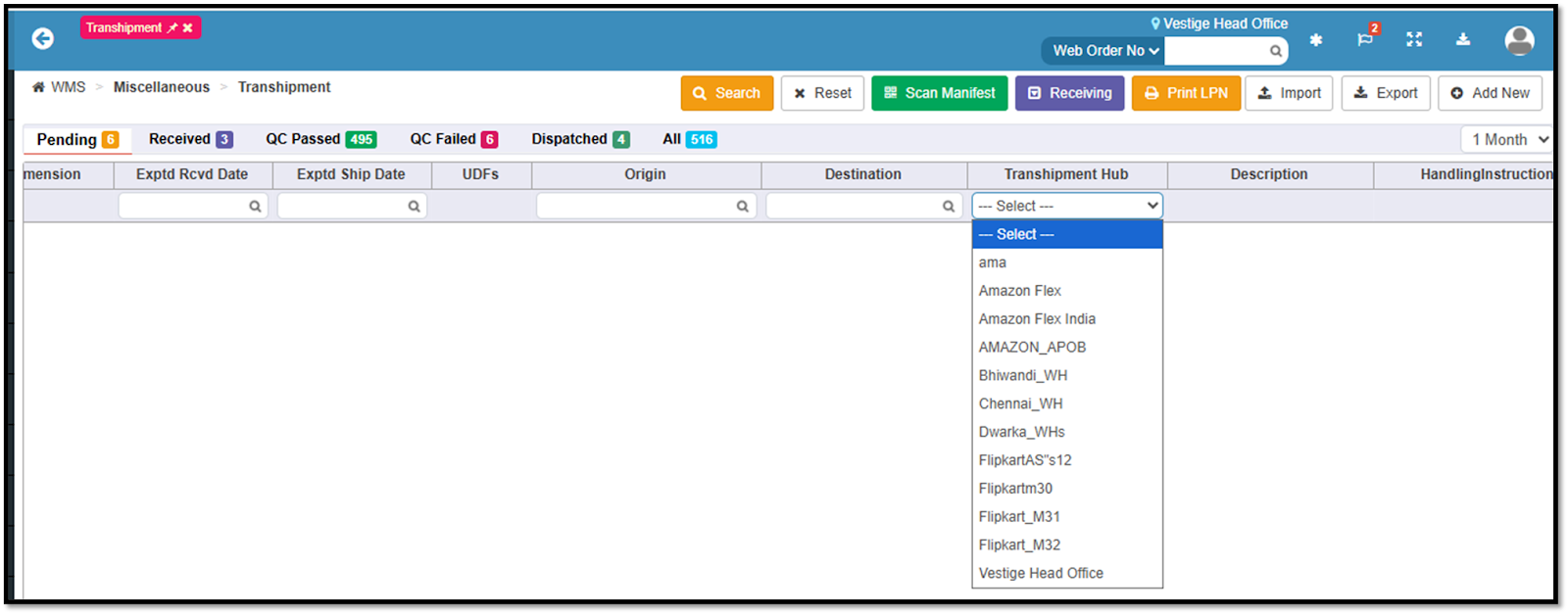
Transhipment Enquiry Enhancement for Head Office
We’ve enhanced the Transhipment Enquiry screen to provide centralized visibility and control for Head Office users across all warehouse locations.
Transhipment Hub Filter for Head Office Users: A new Transhipment Hub filter is introduced, allowing Head Office users to select and view transhipments for any specific hub (location code).
Location-Wise Visibility: The Transhipment Hub dropdown displays all active locations configured for the organization, enabling comprehensive tracking.
Role-Based Behavior:
For Head Office logins:
Users can choose any hub from the Transhipment Hub filter to view corresponding transhipments.For Non–Head Office logins:
The login location remains prefilled, and existing behavior continues without any change.
Benefits:
Centralized Monitoring: Enables Head Office teams to track and monitor transhipments across all locations from a single screen.
Improved Operational Control: Provides better oversight of inter-warehouse movements, helping identify delays or bottlenecks quickly.
Role-Specific Experience: Ensures Head Office users get expanded visibility while maintaining simplicity for location-level users.
Enhanced Decision Making: Supports more informed planning and coordination through consolidated transhipment data.
Navigation: WMS > Miscellaneous > Transhipment
Standard APIs
Change Requests/ Enhancements/ Improvements:
Invoice Qty In Inbound Detail API V1 & V3 Response
The Inbound Detail API (V1 and V3) has been enhanced to include a new line-level field, invoiceQty, in the response.
It represents the quantity billed on the vendor invoice.
End Point -: /RestWS/api/eretail/v1/inbound/detail
/RestWS/api/eretail/v3/inbound/detail
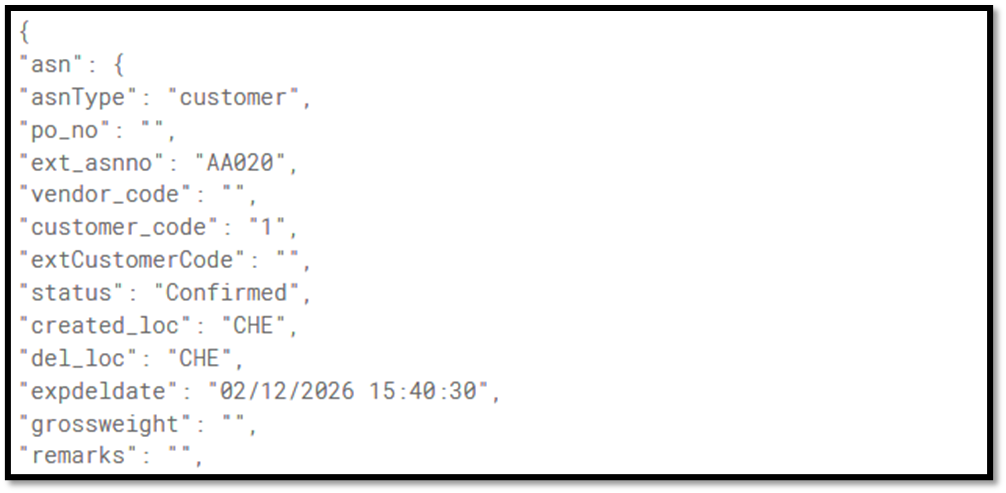
Required Ext. customer code in ASN create API
The ASN Create API (V1 and V4) has been enhanced with a new conditional field extCustomerCode, for Customer-type ASNs.
The API now supports ASN creation using either the internal customer code or the external customer code.
When both customerCode and extCustomerCode are provided, and their values differ, the system will give priority to customerCode.
Duplicate external customer code validation is applied to prevent incorrect ASN creation.
End Point -:/RestWS/api/eretail/v1/asn/create
/RestWS/api/eretail/v4/asn/create
Introducing a new API for Unpack
A new REST API has been introduced to automate the order unpack process and reduce manual intervention.
With this enhancement, orders can now be automatically unpacked based on key order details, and the delivery status will be updated to “Pick Complete” at both header and line levels. This ensures real-time status updates and improved process efficiency.
This functionality is applicable to B2C orders only, and all existing unpack validations available on the UI are now consistently enforced through the API.
End Point- RestWS/api/eretail/v1/order/orderUnpack
Financials/ E-filing Systems Integrations:
Change Requests/ Enhancements/ Improvements:
Sales Return Processing Now Includes Required Invoice Identification
Enhanced the API payload structure to include invoice-level reference information, as required to create credit notes in sales return scenarios.
Credit notes are now automatically recorded in ZohoBooks with complete invoice reference information, ensuring accurate financial reporting.
Navigation: Vin e-Retail >> Logs >> Accounting Log >> ZohoBooks >> Sales Return