Vinculum Release Notes
Version 9.3.179
16th December, 2025
Vin OMS & WMS
Order Management:
Change Requests/ Enhancements/ Improvements:
Transhipment Order Creation from Web UI
Transhipment orders can now be created directly from the web UI, eliminating previous limitation where transhipment orders could only be created through import functionality, providing users with flexible order creation options based on operational requirements.
This enhancement streamlines transhipment workflows by enabling quick, on-demand order creation without preparing import files, reducing manual errors and improving operational efficiency for inter-warehouse shipment transfers.
Navigation: Vin e-Retail >> WMS >> Miscellaneous >> Transhipment

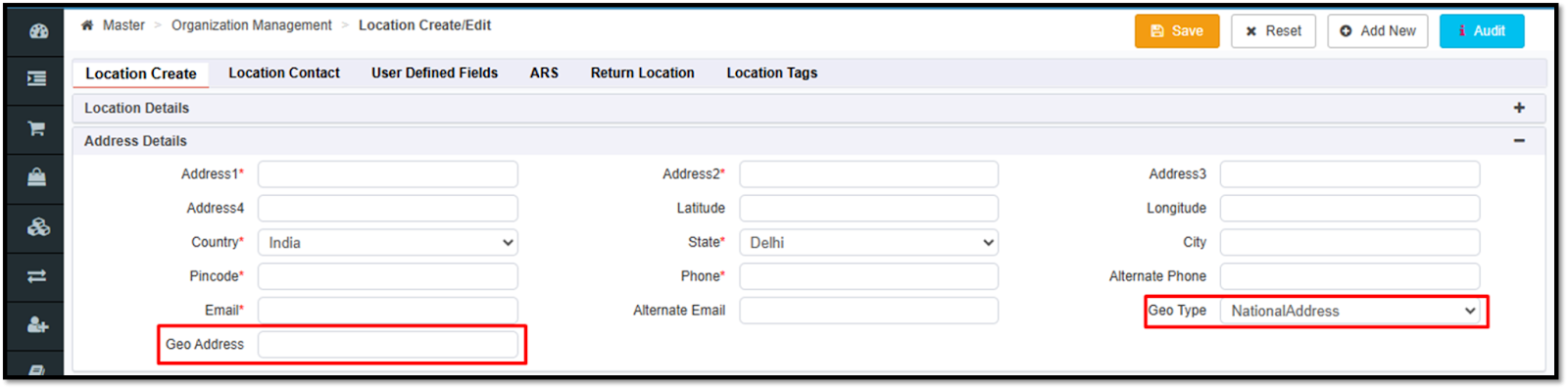
Provision to Capture Geo Address in Location Master
Two new fields Geo Type and Geo Address have been added to the Location Master, enabling businesses to capture and maintain standardized geographic address codes and address type classifications at the location level for compliance requirements.
This enhancement ensures transporters receive mandatory geo address information during the packing stage, preventing shipment rejections and delays caused by missing or non-compliant address codes, while supporting regions with government-mandated address standardization requirements for accurate last-mile delivery and regulatory compliance.
Navigation: Vin e-Retail >> Masters >> Organization Management >> Location Enquiry
Configurable Language Settings for Transhipment UDFs
Language settings are now available for all 15 Transhipment UDFs, enabling businesses to rename and customize UDF labels according to their specific business terminology.
This enhancement eliminates confusion caused by generic UDF naming by allowing users to see familiar, business-specific, and language-appropriate labels tailored to their operational context.
Navigation: Vin e-Retail >> Admin >> Miscellaneous >> Language Setting

New Webhook for Transhipment Order Events
A new webhook has been introduced for transhipment orders to push real-time updates of transhipment status changes instantly, which sends webhook callbacks whenever relevant transhipment order updates occur, eliminating reliance on manual intervention, scheduled batch jobs, or polling-based integrations.
This enhancement significantly reduces the risk of data mismatches between Vin e-Retail and external systems by ensuring updates are pushed immediately upon occurrence, enabling seamless synchronization across integrated platforms.
Navigation: Vin e-Retail >> Admin >> Miscellaneous >> Manage API >> Register Webhook

Warehouse Management:
Change Requests/ Enhancements/ Improvements:
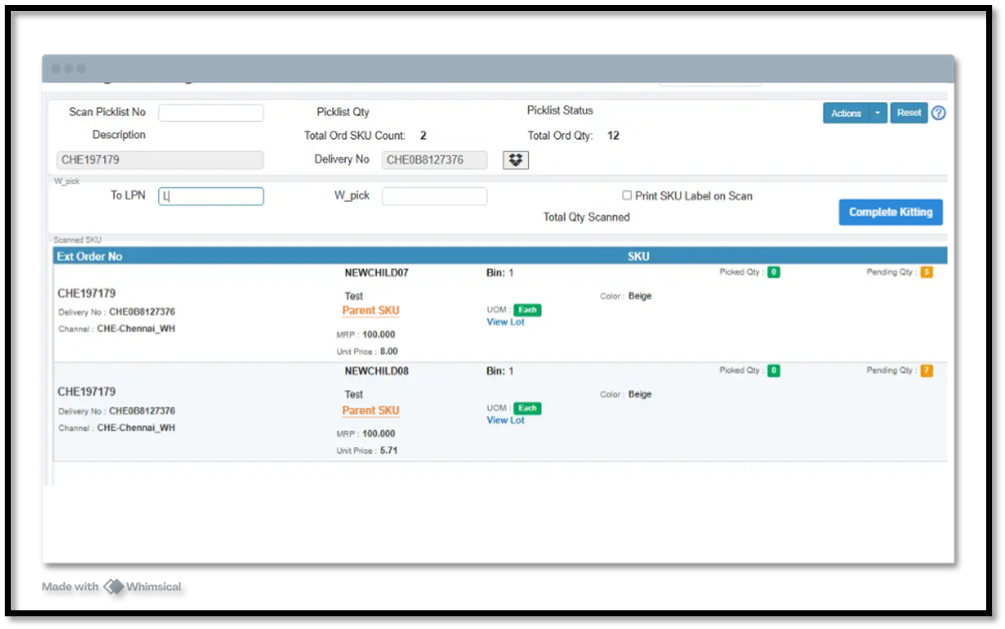
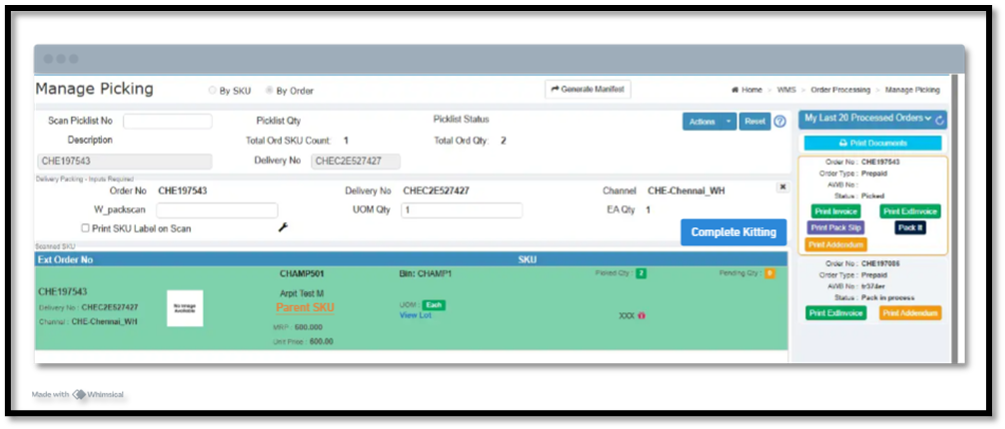
Kit Order Picking and Packing Enablement
We’ve enhanced the Manage Picking workflow (Web + Mobile) to fully support Kit Order processing for B2C orders.
Users can now pick and pack Kit Orders directly from the Manage Picking screen, similar to standard B2C order processing workflow.
Child SKUs of a Kit (virtual BOM components) can be scanned, picked, and packed individually.
The system supports short pick and reallocation based on existing business logic.
Kitting completion is allowed only when all child SKUs are fully picked or packed.
Benefits:
Aligns Kit Order handling seamlessly with existing B2C workflows.
Improves operational flexibility by enabling component-level picking and packing.
Ensures accurate fulfilment and reduces manual intervention in Kit processing.
Navigation: WMS >> Order Processing >> Manage Picking
Introduction of Bin Location Type in Bin Master Bulk Upload
A new enhancement has been added to the Bin Master Bulk Upload, allowing warehouse teams to define the Bin Location Type during bulk uploads, ensuring faster bin creation..
Users can now specify the Bin Location Type when uploading bins in bulk.
The system now supports creation of Case-type bins through the upload—previously only possible through manual support intervention.
The Bin Location Type field is mandatory for all new bin creations.
Benefits:
Enables faster and autonomous bin setup without dependency on support teams.
Ensures consistent bin configuration across large-scale warehouse setups.
Reduces manual effort and accelerates warehouse onboarding.
Navigation: WMS >> Miscellaneous >> Bulk Upload
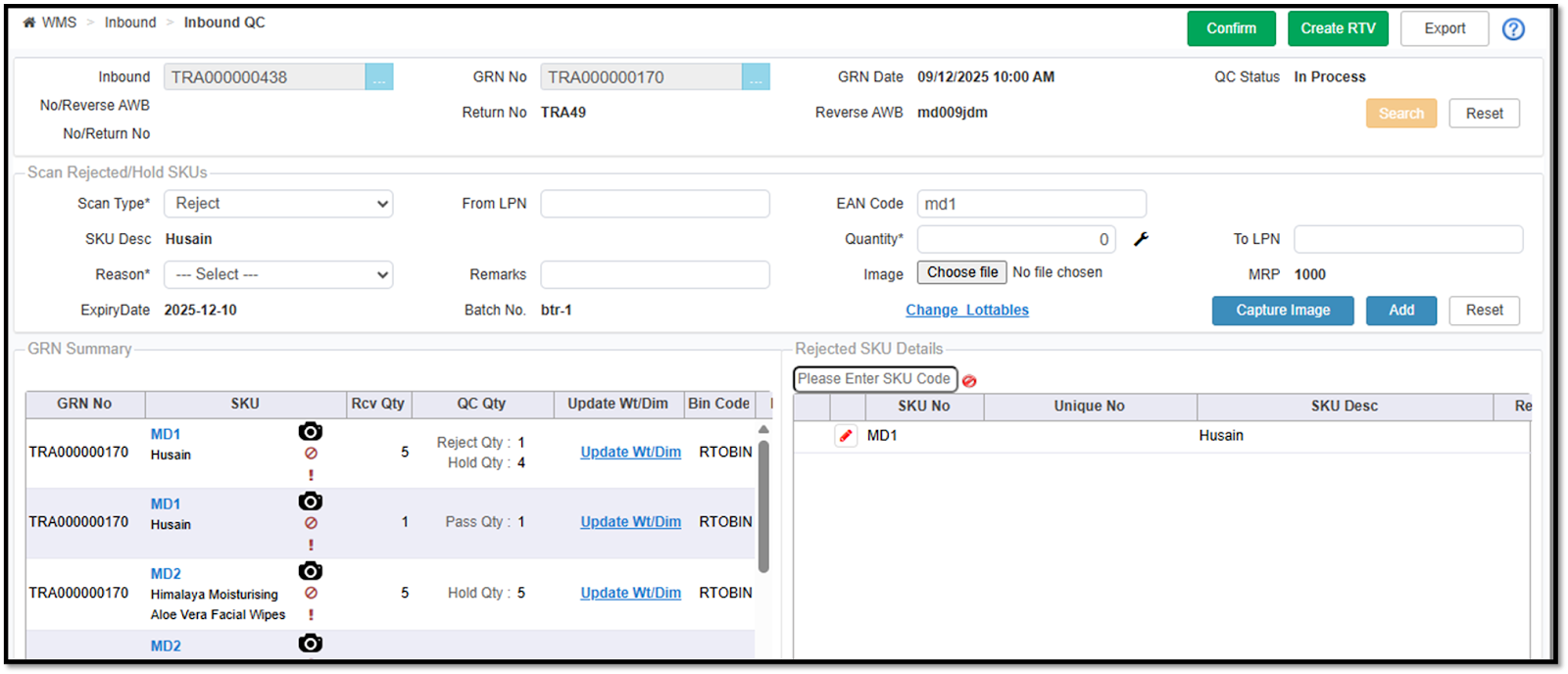
Provision to mark Incorrect Lot during Inbound QC
The Inbound QC process has been enhanced to help users quickly identify and correct SKUs received with missing or incorrect lot information.
Lottable fields now auto-display when a SKU is scanned during QC, allowing immediate correction through a single pop-up screen.
Users can update incorrect lot details using the “Update Lottables” hyperlink in both Pass and Reject scan flows.
When a SKU is in good condition but has incorrect lot details, users can update the lot and save an auto QC reason linked to the wrong lot.
The system performs a stock adjustment for incorrect lot discrepancies and automatically recommends the default bin for such cases.
This feature is configuration-based and can be enabled as needed.
Benefits:
Ensures accurate lot information during inbound QC.
Reduces manual corrections and future stock discrepancies.
Improves inventory integrity by providing quick and guided lot updates.
Navigation: WMS >> Inbound >> Inbound QC
Changes in the Inventory Move By Task
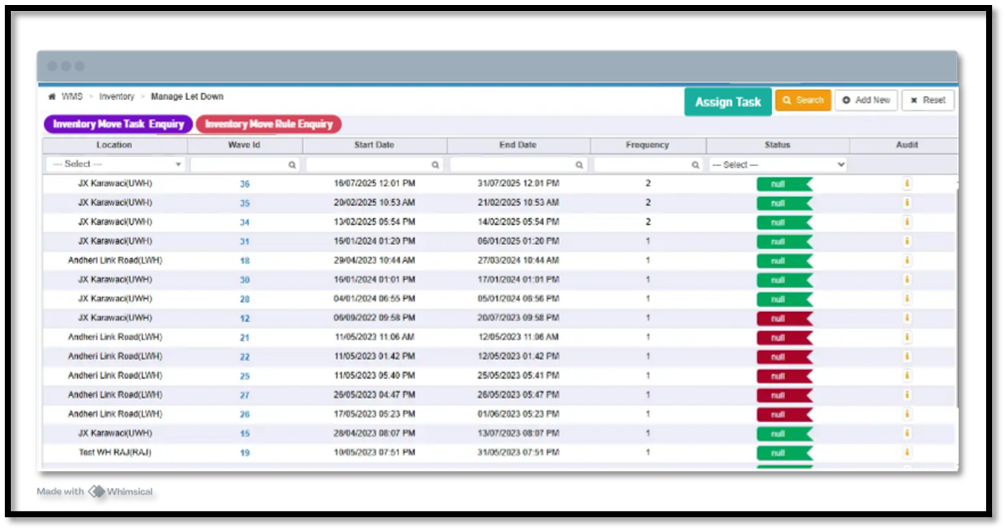
The Inventory Move module has been enhanced with a simpler navigation structure, improved rule configurations, and more flexible task management to streamline warehouse operations.
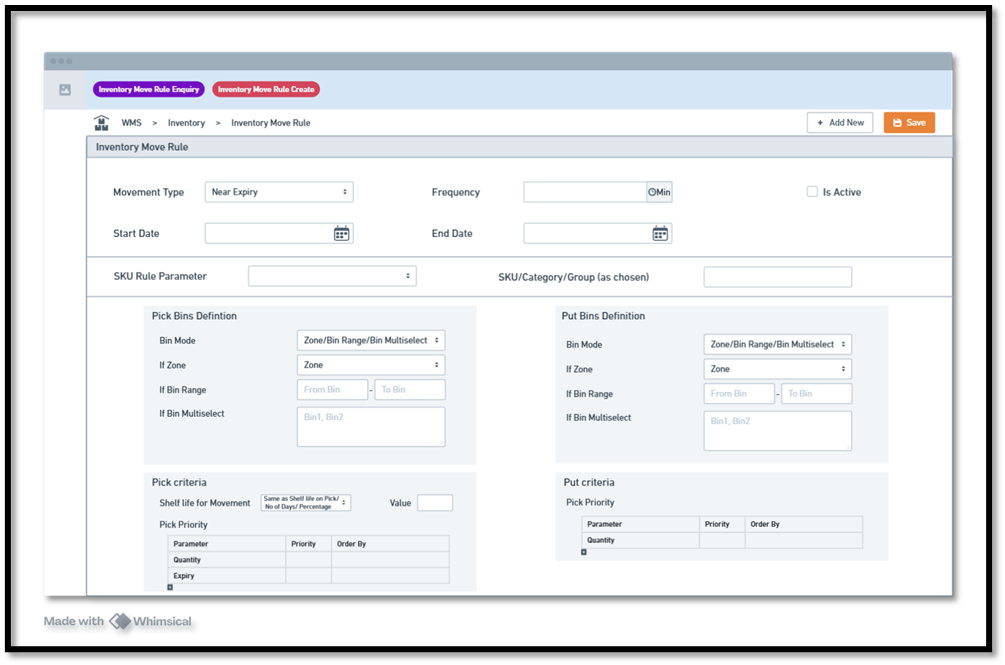
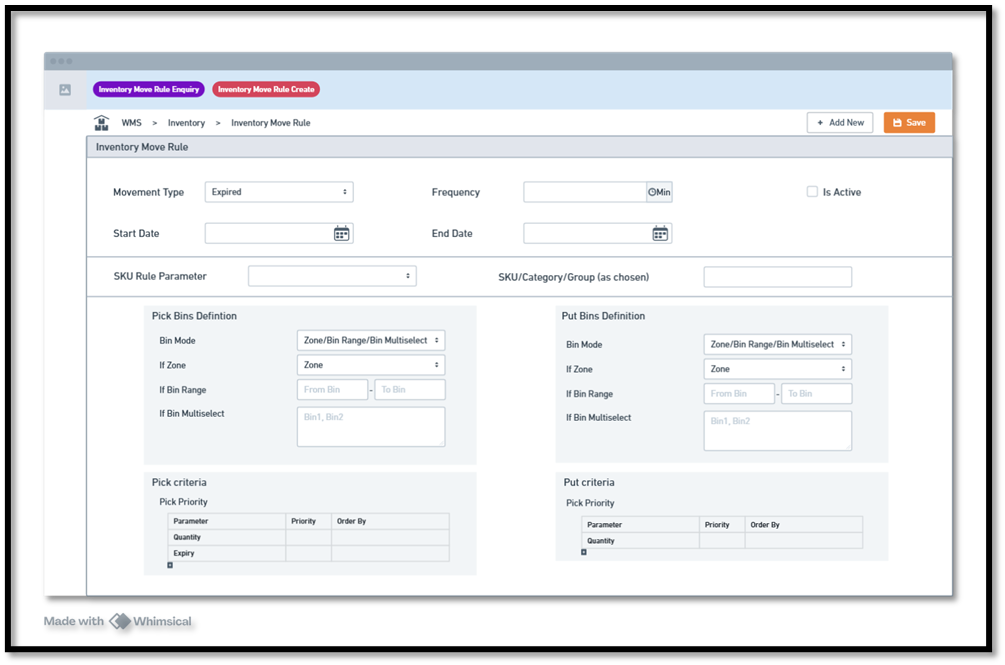
Redesigned Inventory Move Rule Creation: Supports detailed configuration for Replenishment, Near Expiry, and Expired inventory handling.
Enhanced SKU-Level Configuration: Movement rules can now be defined based on selected SKUs, brand, category, subcategory, SKU group, and SKU location.
Flexible Pick & Put Bin Setup: Users can configure bins using zone selection, bin range, or multi-bin selection.
Replenishment Rule Enhancements: Allows priority settings based on MRP, Expiry, and Quantity, with sorting options such as high-to-low or low-to-high.
Near Expiry Management: Thresholds can be configured using shelf-life-on-picking, fixed days, or percentage of total shelf life, enabling automated identification and movement of soon-to-expire inventory.
Expired Inventory Handling: Automatically detects expired lots and moves them to disposal or quarantine bins based on configured logic.
Benefits:
Provides more granular control over inventory movement.
Automates identification and handling of near-expiry and expired stock.
Improves warehouse efficiency with optimized replenishment and precision-based rules.
Reduces manual errors through rule-driven task creation.
Navigation: WMS >> Inventory >> Inventory Move by Task

Vin FBS (Store Fulfillment App)
Change Requests/ Enhancements/ Improvements:
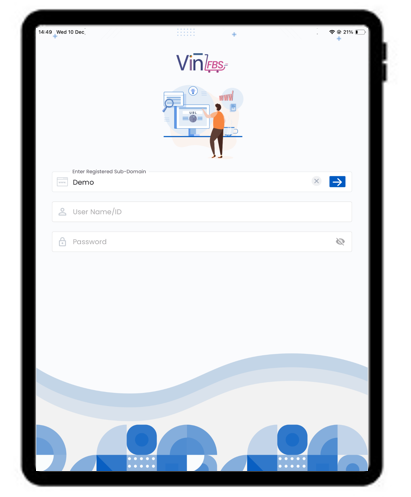
Enhanced Login Process of Vin FBS Application
The Vin FBS application login process has been streamlined into a single, unified page. Users can now enter both their server details and login credentials on one screen, providing improved visibility and significantly enhancing the speed and simplicity of accessing the application.
Vin Endless Aisle
Change Requests/ Enhancements/ Improvements:
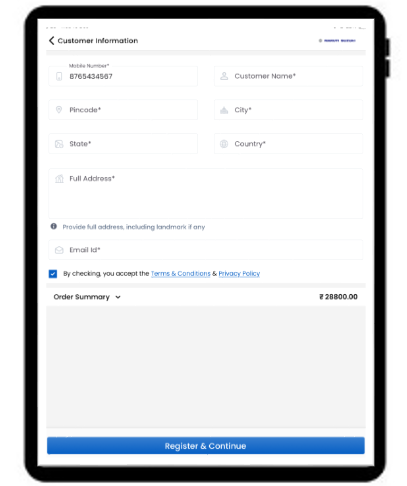
New Enhanced Customer Registration Page
The Customer Registration page on Endless Aisle has been upgraded to a cleaner, simplified one-page UI. This enhancement streamlines the customer onboarding process and enables store staff to capture customer details more quickly, accurately, and with minimal effort.